MTE API Relay on Azure
Introduction
MTE API Relay protects HTTP traffic between server applications with two relays. Your service sends ordinary HTTP to an outbound relay, which encrypts each request and sends it to an inbound relay in front of the destination API. The inbound relay decrypts it, calls the API, and encrypts the response for the trip back.
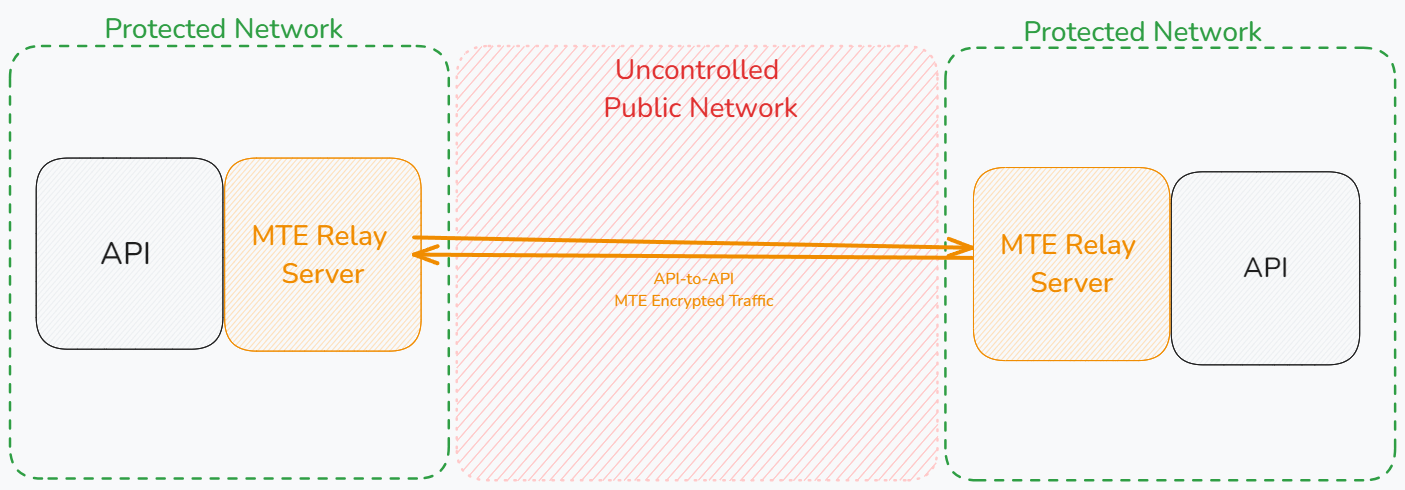
Both relays in the diagram are MTE API Relay instances. The outbound relay sits next to the calling API and the inbound relay next to the target API.
Both relays of a chain run the MTE API Relay image, which pairs only with another MTE API Relay. It cannot pair with an MTE Relay Server or with the client libraries. v5 relays pair only with v5 relays; see Upgrading from v4.
On Azure, MTE API Relay is a Kubernetes app on Azure Marketplace. You install each relay with a six tab wizard in the Azure portal. The wizard creates an Azure Kubernetes Service (AKS) cluster or uses one you have, installs the relay as a cluster extension in its own namespace, and stores the relay's first route, so the relay is serving when the deployment finishes. The Relay role field on the wizard's Relay tab picks what the install runs:
- Inbound sits in front of your API: the relay pods, scaled by a horizontal pod autoscaler, the control plane that configures them, and optionally one Valkey pod for shared pair state.
- Outbound sits beside the services that call an API through its inbound relay: relay pods only. They take their one route from the wizard, keep their pairs in memory, and never face the internet.
The offer bills through your Azure subscription at the plan's hourly price for every running relay pod and for the control plane pod of an inbound install, so the subscription is the license. The price is on the offer's Plans + Pricing tab. A pod bills from the moment it runs, ready or not: an inbound install with one relay pod bills two pods, an outbound install with one relay pod bills one, and the default range of two to six relay pods bills three to seven inbound or two to six outbound.
For MTE API Relay v4 on Azure, see the MTE API Relay v4 Azure guide.
Before you start
- An Azure subscription that can buy Marketplace software. Pay as you go and Enterprise Agreement subscriptions can. Free credits and some sponsorship subscriptions cannot.
- For an inbound relay, your API's address, such as
https://api.example.com, reachable from the cluster, and an admin password for the control plane, 16 characters or more, kept in your password manager. - For an outbound relay, the inbound relay's address, such as
https://partner-relay.example.com. Install the inbound relay first. - An AKS cluster per side, or none. The wizard can create one. An existing
cluster needs Kubernetes 1.30 or later, a managed identity, and Linux
amd64nodes. - A shell for the checks after the install. Azure Cloud Shell (Bash) in
the portal already has
azandkubectl. On your own machine, install the Azure CLI andkubectl. To open the control plane in a browser, you needkubectlon a machine that also has the browser.
If the cluster restricts egress, allow outbound HTTPS to
<region>.dp.kubernetesconfiguration.azure.com, mcr.microsoft.com,
*.data.mcr.microsoft.com, arcmktplaceprod.azurecr.io and its regional
*.data.azurecr.io endpoints, *.ingestion.msftcloudes.com, and
*.microsoftmetrics.com, plus the inbound relay or your API and, with Azure
Managed Redis, port 10000 to the cache.
Install from Azure Marketplace
In the Azure portal, open Marketplace, search for MTE API Relay, open the Eclypses offer, pick the plan, and choose Create. From an existing cluster you can also open Extensions + applications, choose Add, and pick the offer.
Run the wizard once per relay: first for the inbound relay, then for the outbound relay on the calling side. The tabs are the same for both; the Relay role on the Relay tab changes what the Relay and Control plane tabs ask for.
1. Basics
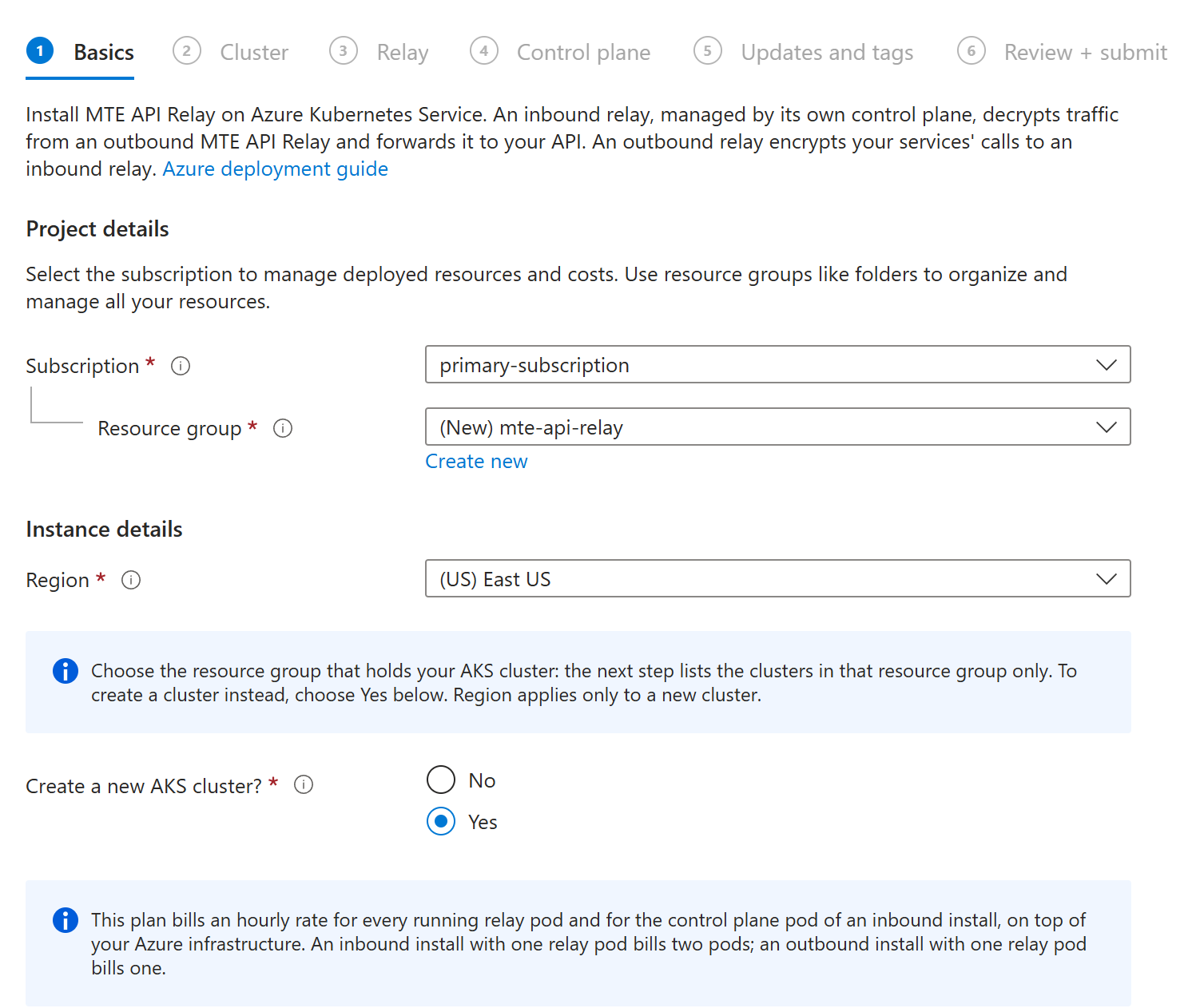
| Field | What to enter |
|---|---|
| Subscription | The subscription that pays for the plan. |
| Resource group | For an existing cluster, the cluster's own resource group: the next tab lists only the clusters in it. For a new cluster, any resource group, or Create new. |
| Region | Where a new cluster goes. An existing cluster keeps its own region, so this field does nothing for it. |
| Create a new AKS cluster? | No installs into a cluster you already have. Yes creates one first, with the settings on the next tab. |
2. Cluster
With an existing cluster, pick it from AKS cluster. If the tab says the resource group has no AKS cluster, go back to Basics and choose the resource group the cluster lives in.
With a new cluster, the tab shows its settings:
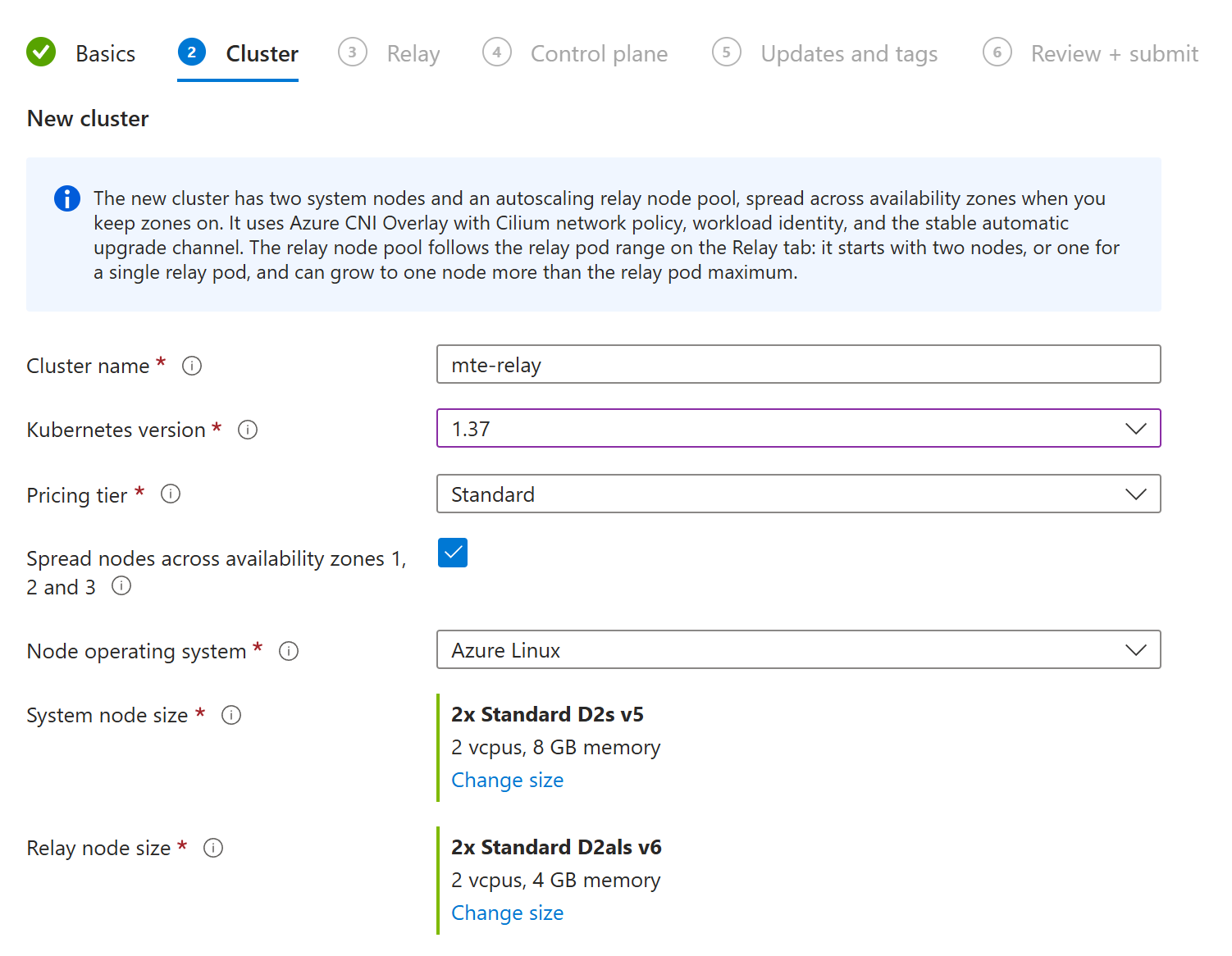
| Field | What to choose |
|---|---|
| Cluster name | Defaults to mte-relay. 2 to 54 letters, numbers, and hyphens. It is also the cluster's DNS prefix. |
| Kubernetes version | Required. The list holds the generally available versions in the region, newest first. Pick the first one. |
| Pricing tier | Standard, the default, carries Microsoft's uptime SLA for the Kubernetes API server. Free has none; use it only to evaluate. |
| Spread nodes across availability zones 1, 2 and 3 | On by default. Keeps the relay running through a zone outage. Turn it off only in a region without zones; it cannot change later. |
| Node operating system | Azure Linux by default, or Ubuntu. |
| System node size | Defaults to Standard_D2s_v5. Two system nodes run the cluster's own add ons. A taint keeps the relay off them. |
| Relay node size | Defaults to Standard_D2als_v6. The relay pool runs the relay pods and, inbound, the control plane and Valkey. A 2 vCPU, 4 GiB node fits one medium relay pod. The large pod size needs 4 vCPU nodes. |
You do not pick a node count. The relay pool autoscales between two nodes, or
one for a single relay pod, and one node more than the relay pod maximum on
the next tab: two to seven nodes with the defaults. The new cluster also gets
Azure CNI Overlay with Cilium network policy, workload identity, and the
stable automatic upgrade channel with NodeImage node updates. Creating a
cluster adds about five minutes to the install.
3. Relay
| Field | What to choose |
|---|---|
| Relay role | Inbound, the default, receives from an outbound relay and calls your API. Outbound encrypts your services' calls to an inbound relay. |
| Extension name | Defaults to mte-relay-mar. The extension's name on the cluster. Each install in a cluster needs its own. |
| Namespace | Defaults to mte-relay-mar. One install per namespace. An inbound and an outbound install in one cluster need different namespaces; this page uses mte-relay-mar and mte-relay-mar-out. |
Inbound
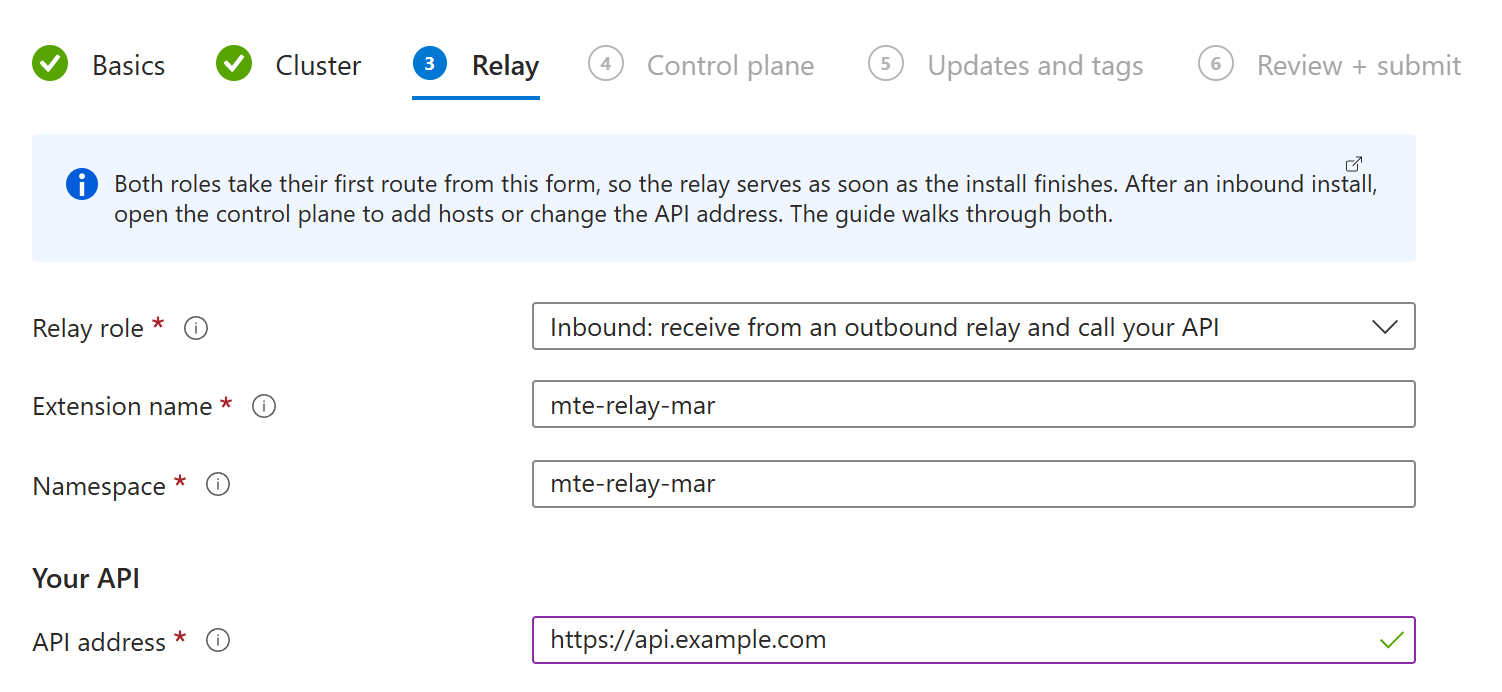
API address is the only required field. It is where the inbound relay
forwards decrypted requests, such as https://api.example.com. Use http://
only for an API on a private network. The address becomes a single route
that matches every host name, so whatever name the outbound relay calls, the
inbound relay forwards to this API. Add host specific routes later in the
control plane, under Proxies.
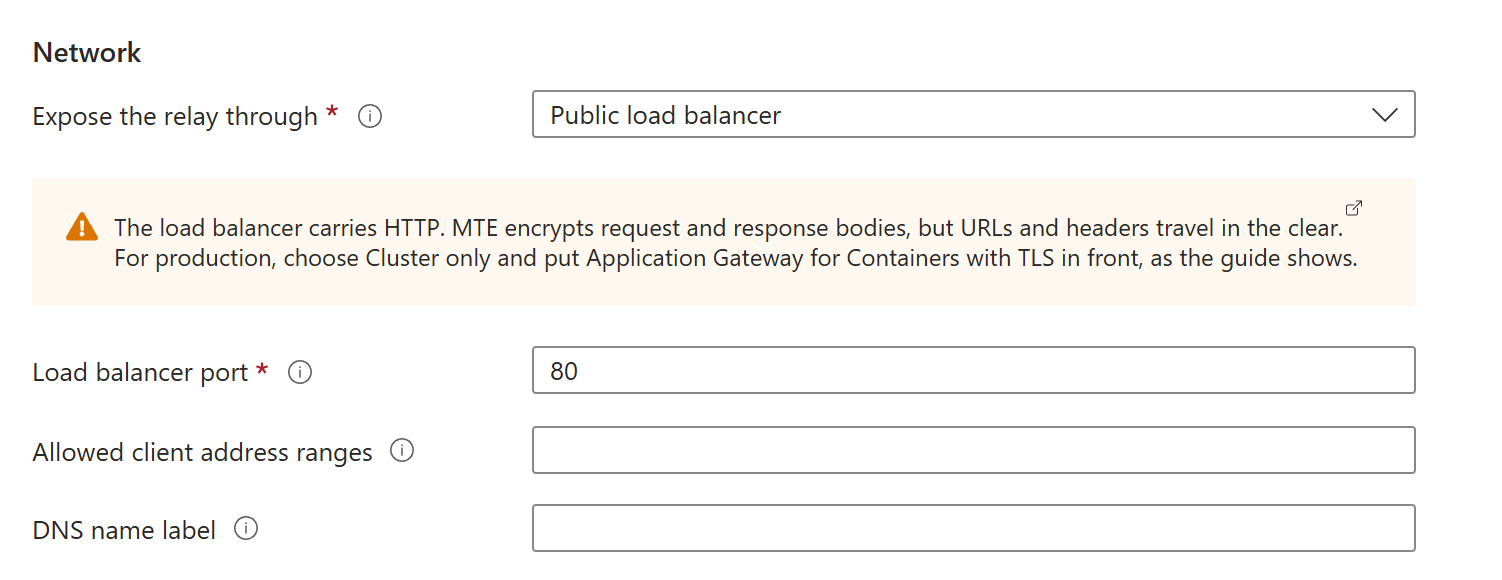
The Network section places the relay:
| Field | What to choose |
|---|---|
| Expose the relay through | Public load balancer, the default, gives the relay a public IP address. Internal load balancer gives it a private address in the cluster's virtual network. Cluster only gives it no address outside the cluster, for Application Gateway for Containers or your own ingress. |
| Load balancer port | Defaults to 80. The port outbound relays connect to. The relay listens on 8080 inside the pod. |
| Allowed client address ranges | Empty by default, which admits every address. IPv4 CIDRs the load balancer admits, separated by commas, such as the outbound side's egress addresses. |
| DNS name label | Public load balancer only. Names the address <label>.<region>.cloudapp.azure.com. The label must be unique in the region. |
Both load balancers carry plain HTTP, and the tab warns about it. MTE
encrypts every request and response body, but URLs and headers travel in the
clear, and an outbound relay calls only https:// addresses unless you allow
http:// on its side. For production, choose Cluster only and put
Application Gateway for Containers with TLS in front, as in
Production setup. You can switch later without
reinstalling.
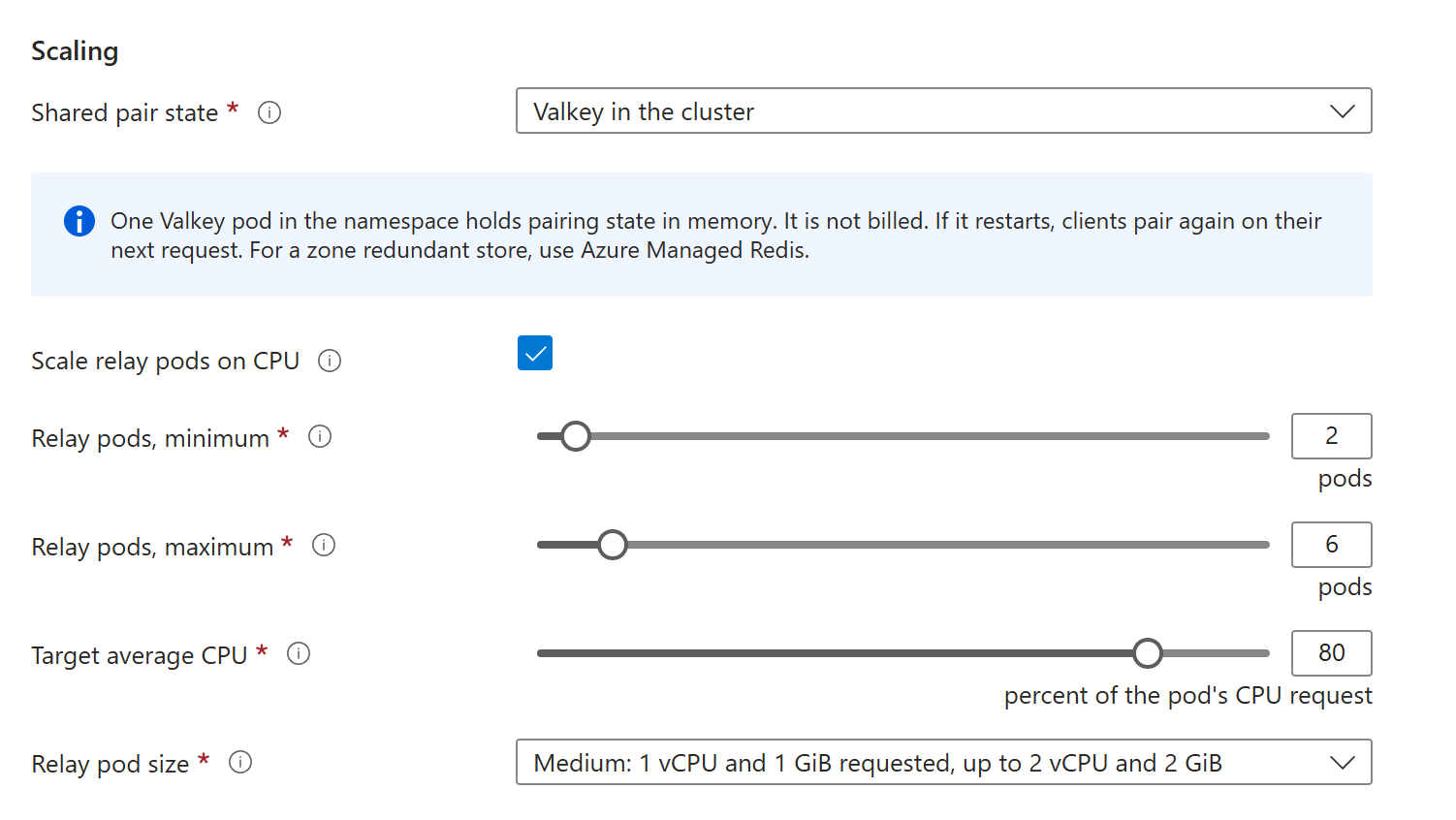
The Scaling section sizes it:
| Field | What to choose |
|---|---|
| Shared pair state | None runs exactly one relay pod. Valkey in the cluster, the default, runs one Valkey pod, which is not billed, so two or more relay pods can serve any outbound relay. Existing Redis uses a cache you run, such as Azure Managed Redis. |
| Scale relay pods on CPU | On by default. A horizontal pod autoscaler adds a relay pod when average CPU passes the target, and removes one a minute after five quiet minutes. Off runs the minimum. |
| Relay pods, minimum | Defaults to 2. The autoscaler's floor, 1 to 20. Two or more keep the relay up during updates and node restarts. |
| Relay pods, maximum | Defaults to 6. The autoscaler's ceiling, 1 to 50, and so the most relay pods billed in an hour. |
| Target average CPU | Defaults to 80. Percent of each pod's CPU request, 30 to 90. |
| Relay pod size | Medium by default. Small requests 0.5 vCPU and 512 MiB, Medium 1 vCPU and 1 GiB, Large 2 vCPU and 2 GiB; each may use twice its request. A new cluster with 2 vCPU relay nodes offers Small and Medium only. |
With None, the pod fields disappear: the relay runs one pod. Valkey keeps pair state in memory, so if its pod restarts, the outbound relays pair again. For a zone redundant store, choose Existing Redis:
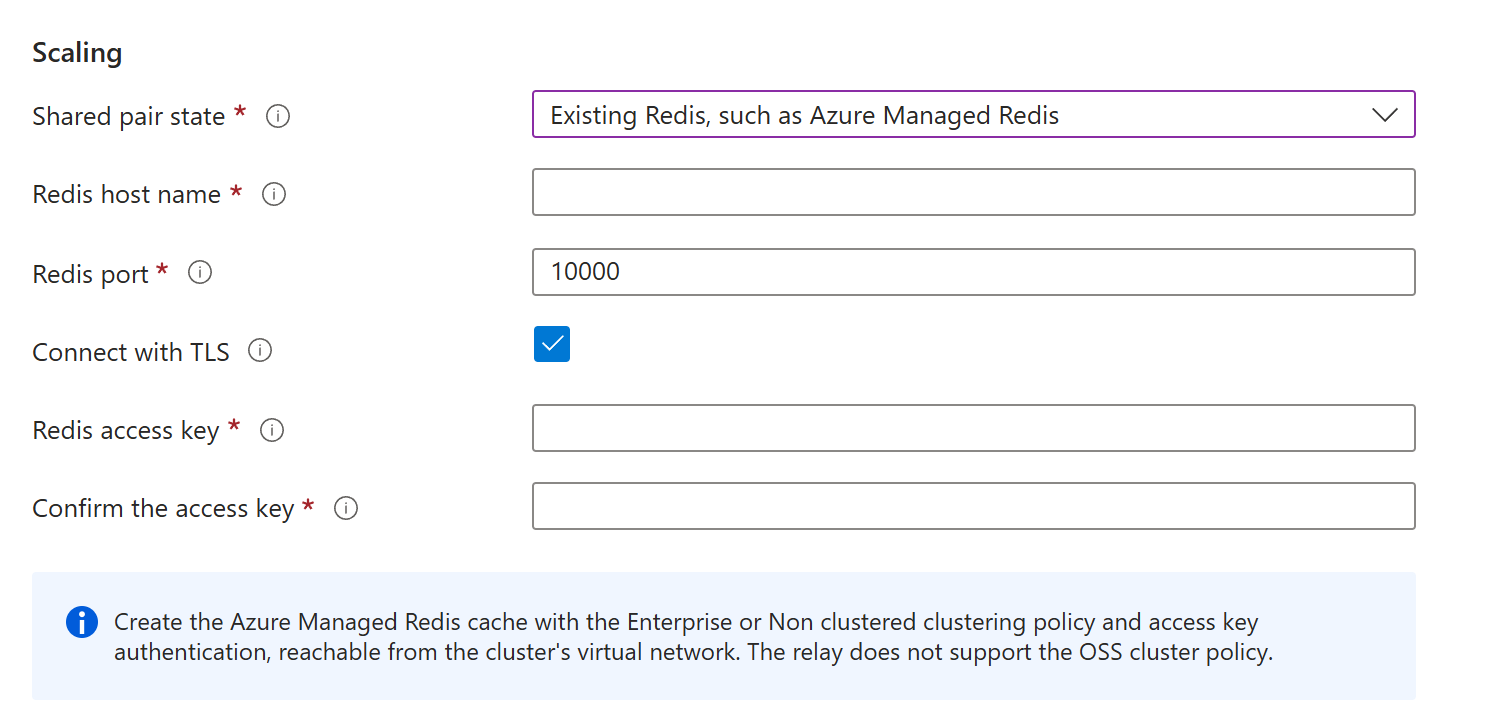
The cache needs the Enterprise or Non clustered clustering policy,
never OSS, access key authentication, and a network path from the
cluster. Azure Managed Redis below creates one. Port
10000 and Connect with TLS are Azure Managed Redis's own settings.
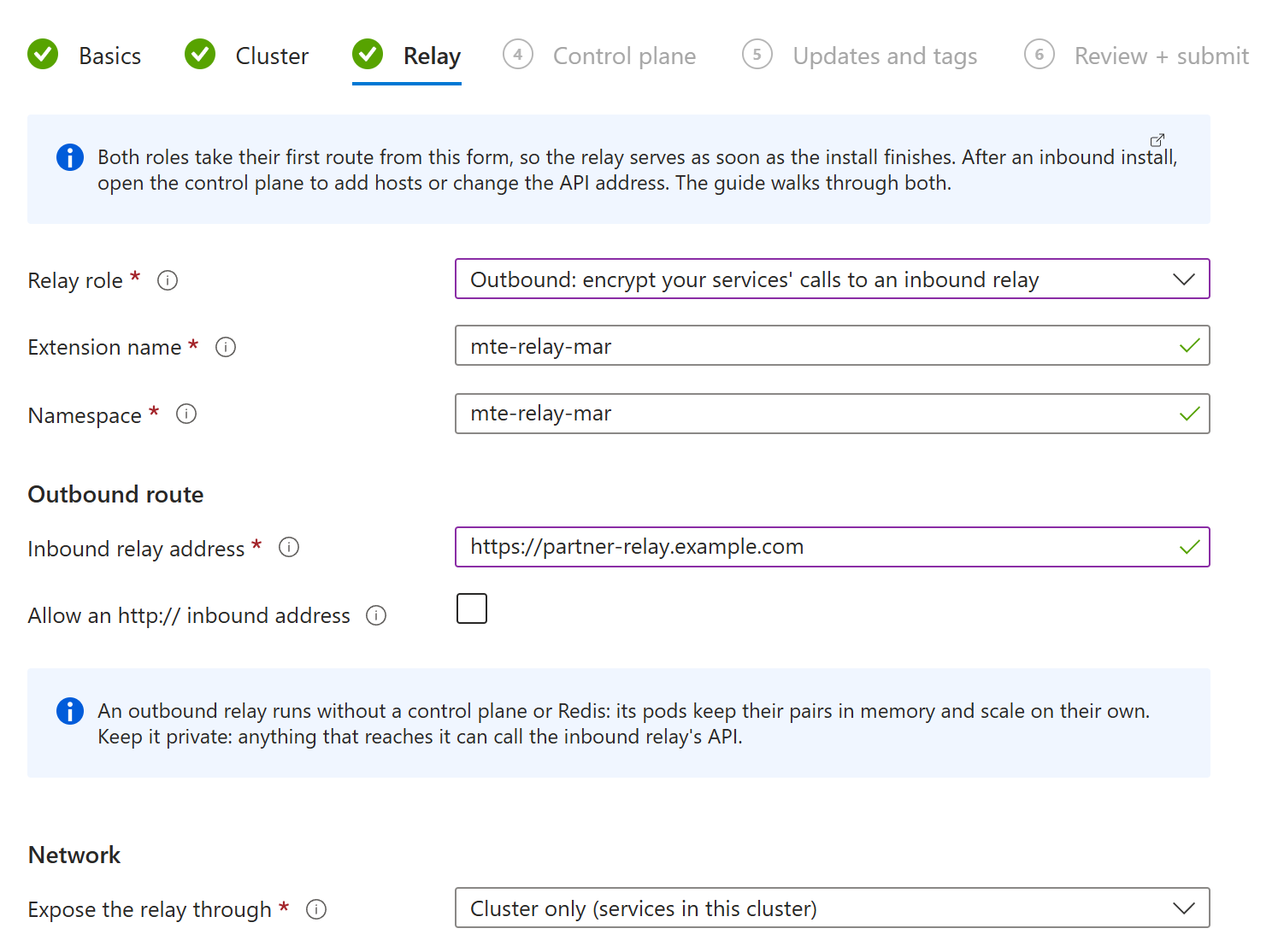
Outbound
| Field | What to choose |
|---|---|
| Inbound relay address | Required. The inbound relay's address, such as https://partner-relay.example.com. Your services call the outbound relay with plain HTTP, and it forwards every request there, encrypted. |
| Allow an http:// inbound address | Off by default. Required for an http:// address. Use it only for an inbound relay on a private network, such as an internal load balancer in a peered virtual network, or the same cluster. MTE still encrypts every body. |
| Expose the relay through | Cluster only, the default, serves services in this cluster on port 8080. Internal load balancer also serves the cluster's virtual network, on the load balancer port. An outbound relay is never public. |
The outbound role has no Redis field. Each outbound pod keeps its own pairs in memory and pairs with the inbound relay on its own, so the pods scale freely with the same autoscaling, pod range, and pod size fields as above. Keep the outbound relay private: anything that reaches it can call the inbound relay's API.
4. Control plane
Inbound installs the control plane:
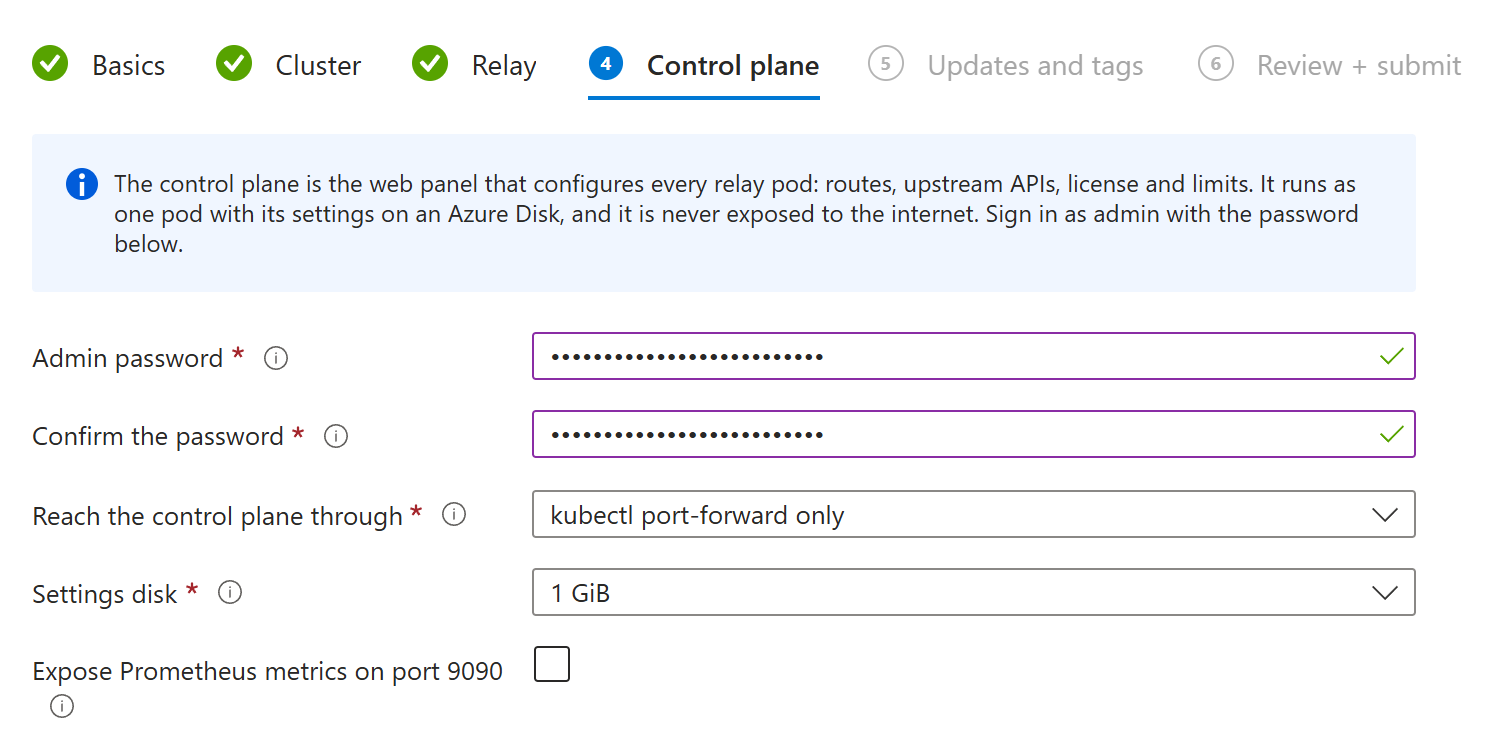
| Field | What to choose |
|---|---|
| Admin password | Required, 16 to 128 characters. You sign in to the panel as admin with it. |
| Reach the control plane through | kubectl port-forward only, the default, opens nothing: administrators reach the panel through kubectl. Internal load balancer gives it a private address on port 8081 in the cluster's virtual network, for administrators on a VPN or a peered network. It serves plain HTTP, so use it only on a network you trust. The panel is never public. |
| Allowed administrator address ranges | Empty by default, which admits the whole virtual network. Internal load balancer only. Private IPv4 CIDRs, separated by commas, such as your VPN's client range. |
| Settings disk | 1 GiB by default, or 4 GiB. The Azure Disk that holds the panel's settings and the last 50 versions of the configuration. A few megabytes are used. It can grow later, not shrink. |
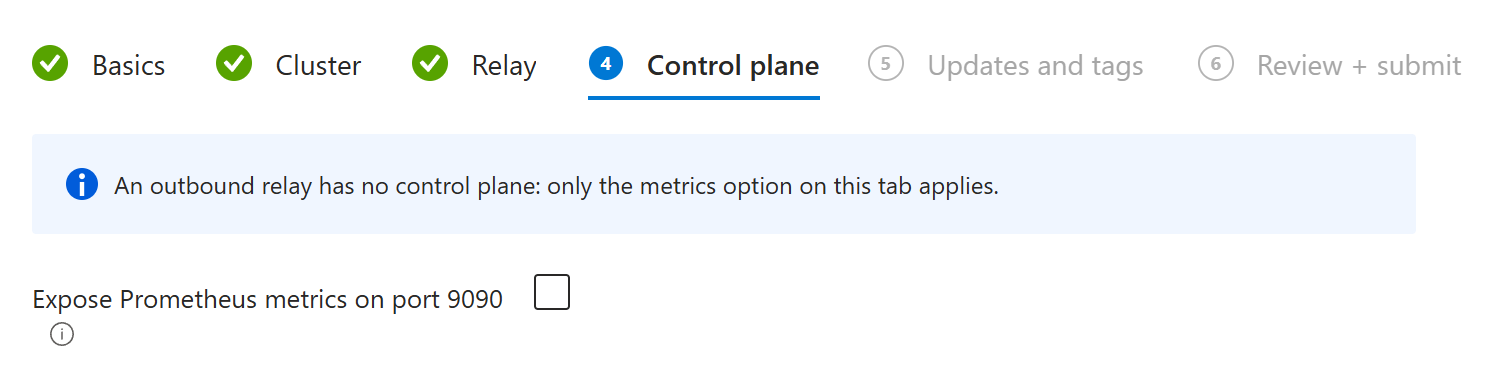
| Expose Prometheus metrics on port 9090 | Off by default. Relay pods and the panel serve /metrics on port 9090 inside the cluster, behind a bearer token in the Secret mte-api-relay-metrics. |
Outbound has no control plane, so only the metrics option is left:
5. Updates and tags
| Field | What to choose |
|---|---|
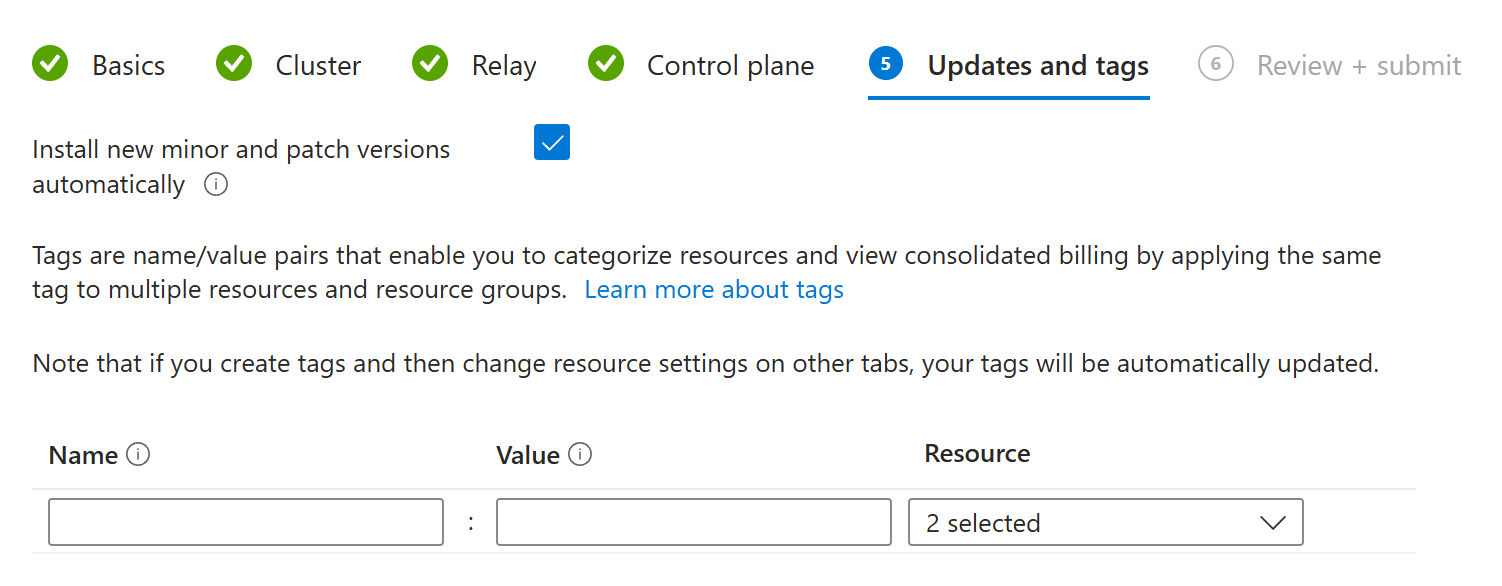
| Install new minor and patch versions automatically | On by default. Azure upgrades the extension to new 5.x releases, security fixes included. Major versions always wait for you. Keep both relays of a chain on the same version. |
| Tags | Shown only for a new cluster, and applied to it. Extensions take no tags. |
6. Review + create
The portal checks every tab, then shows your choices, the plan's price, and its terms. Choose Create.
The deployment page lists the cluster, if you asked for one, and then the extension. Azure waits until the relay pods are ready before it marks the extension Succeeded, so a finished deployment is a serving relay. If the deployment fails, see Troubleshooting.
After the install
Check the inbound relay
In the portal, open the cluster, then Kubernetes resources >
Services and ingresses, and filter to the mte-relay-mar namespace. The
mte-api-relay service's External IP is the inbound relay's address.
Or, from Azure Cloud Shell:
export RG=mte-relay          # Update this value! The cluster's resource group
export CLUSTER=mte-relay     # Update this value! The cluster's name

az aks get-credentials --resource-group $RG --name $CLUSTER
kubectl -n mte-relay-mar get pods
RELAY=$(kubectl -n mte-relay-mar get svc mte-api-relay -o jsonpath='{.status.loadBalancer.ingress[0].ip}')
curl http://$RELAY/api/mte-echo
Every pod is 1/1 Running, and the echo answers {"message":"true",...}.
Check the chain
To try a full chain before the inbound relay has TLS, run the wizard a second time on the same cluster with these Relay tab values:
| Field | Value |
|---|---|
| Relay role | Outbound |
| Extension name and Namespace | mte-relay-mar-out |
| Inbound relay address | http://mte-api-relay.mte-relay-mar, the inbound Service's cluster name. With the inbound relay on Cluster only, add :8080. |
| Allow an http:// inbound address | on |
Then call your API through the outbound relay, with the path and query your service would use:
kubectl -n mte-relay-mar-out run curl --rm -i --restart=Never --image=curlimages/curl:8.10.1 -- \
  curl -s http://mte-api-relay.mte-relay-mar-out:8080/todos/1
The command prints your API's answer after the round trip through both relays. The inbound relay's log shows each request decrypted:
kubectl -n mte-relay-mar logs deployment/mte-api-relay | grep '"event_type":"decryption"'
Once the inbound relay is behind the gateway in Application Gateway for Containers, point the outbound relay at it:
az k8s-extension update --name mte-relay-mar-out --cluster-name $CLUSTER --resource-group $RG \
  --cluster-type managedClusters --yes \
  --config outbound.upstream=https://$RELAY_HOST outbound.allowPlainUpstream=false
The outbound pods restart with the new address. Run the curl again.
Call an API through the chain
Point your service at the outbound relay instead of the destination API, and keep the path and query the same. No special request headers are needed.
# Before
curl -X GET https://api.partner.example.com/data

# After, from a pod in the outbound relay's cluster
curl -X GET http://mte-api-relay.mte-relay-mar-out:8080/data
With Cluster only, the outbound relay's Service listens on 8080; with an internal load balancer, on the load balancer port. Its route answers any host name your services use for it.
Open the inbound control plane
You do not have to open the panel to start serving. Open it to add host names, change the API address, or tune limits.
On a machine with kubectl and a browser, after az aks get-credentials,
start a port forward. It keeps running, so use a second terminal:
kubectl -n mte-relay-mar port-forward svc/mte-api-relay-control-plane 8081:8081
Open http://localhost:8081 and sign in as admin
with the password from the Control plane tab. To read it back from the
cluster:
kubectl -n mte-relay-mar get secret mte-api-relay-control-plane -o jsonpath='{.data.ADMIN_PW}' | base64 -d; echo
The panel opens on the dashboard with your first configuration in place. There is no setup wizard to run; that is the step the Marketplace form replaces.
- Proxies holds one host,
*, that sends every host name to your API, with a client secret the panel generated. Add a host such aspartner-relay.example.comto route it somewhere else. COMPANY_NAMEandLICENSE_KEYunder Configuration stay empty. The subscription is the license.- Configuration holds every other setting. Behind Application Gateway for
Containers, set
TRUSTED_PROXIESthere, as in step 6. - Fleet lists each relay pod by name, with runtime
kubernetes.
The forward is tied to one pod. When the control plane pod is replaced, it
stops with lost connection to pod; run the same command again. The
control plane guide
covers every page of the panel. An outbound install has no panel: change its
route with az k8s-extension update, as in Check the chain.
Production setup
The wizard's defaults make a complete chain. For production, keep its shape and add these:
- Each relay in its own cluster: the outbound relay with the calling services, the inbound relay with the API, each cluster on the Standard tier with availability zones and the cluster autoscaler on. A new cluster from the wizard has all three.
- Two or more relay pods on each side, with autoscaling and a maximum you are willing to pay for.
- Azure Managed Redis with a private endpoint for the inbound relay, as in Azure Managed Redis.
- Application Gateway for Containers in front of the inbound relay, with
a publicly trusted certificate, the web application firewall in Prevention
mode, and
TRUSTED_PROXIESset to its subnet, as in Application Gateway for Containers. - The outbound relay private: Cluster only, or an internal load balancer for callers in the virtual network.
- The control plane reachable only privately: by
kubectl port-forward, or by the internal load balancer from a VPN or a peered network. Never route port 8081 through the gateway. - A copy of the configuration outside the cluster: export it as in Backup and restore, or back the namespace up with Azure Backup for AKS.
- Monitoring: Container insights for pod logs and node metrics, with alerts on each relay Deployment's available replicas. The relay writes JSON logs; see Monitoring and Integrations.
The rest of this section runs from bash, such as Azure Cloud Shell, with RG
and CLUSTER set as in Check the inbound relay.
Azure Managed Redis
For the inbound relay. Valkey in the cluster is one pod: if it restarts, the
outbound relays pair again, and pairing requests in those seconds answer
503 state_store_unavailable. For a zone redundant store, use Azure Managed
Redis. Microsoft is retiring Azure Cache for Redis and no longer creates new
caches in the global Azure cloud.
The relay uses a single endpoint Redis client, so the cache needs the Enterprise or Non clustered clustering policy, never OSS, and access key authentication. Create it, give it a private endpoint in the cluster's virtual network, then turn public access off:
export LOCATION=westus3                  # Update this value! The cluster's region
export AMR=mte-api-relay-redis-$RANDOM   # Cache names are global

az extension add --name redisenterprise --upgrade
az redisenterprise create --resource-group $RG --name $AMR --location $LOCATION \
  --sku Balanced_B1 --clustering-policy EnterpriseCluster --access-keys-auth Enabled \
  --public-network-access Enabled

MC=$(az aks show -g $RG -n $CLUSTER --query nodeResourceGroup -o tsv)
VNET=$(az network vnet list -g $MC --query '[0].name' -o tsv)
az network vnet subnet create -g $MC --vnet-name $VNET -n snet-private-endpoints \
  --address-prefixes 10.226.0.0/24
az network private-endpoint create -g $RG -n $AMR-pe --location $LOCATION \
  --subnet $(az network vnet subnet show -g $MC --vnet-name $VNET -n snet-private-endpoints --query id -o tsv) \
  --private-connection-resource-id $(az redisenterprise show -g $RG -n $AMR --query id -o tsv) \
  --group-id redisEnterprise --connection-name $AMR-pe
az network private-dns zone create -g $RG -n privatelink.redis.azure.net
az network private-dns link vnet create -g $RG -z privatelink.redis.azure.net -n aks-vnet \
  -v $(az network vnet show -g $MC -n $VNET --query id -o tsv) -e false
az network private-endpoint dns-zone-group create -g $RG --endpoint-name $AMR-pe -n default \
  --private-dns-zone privatelink.redis.azure.net --zone-name redis
az redisenterprise update -g $RG -n $AMR --public-network-access Disabled
- The commands assume the virtual network AKS created,
10.224.0.0/12. In your own virtual network, put the private endpoint in any subnet and link the zone to that network. Balanced_B1holds 1 GB. Pair state is small: each paired outbound relay keeps a few kilobytes per pair until it goes idle.
Point the inbound extension at the cache. A protected setting you leave out keeps its stored value, so send only the access key:
KEY=$(az redisenterprise database list-keys -g $RG --cluster-name $AMR --query primaryKey -o tsv)
az k8s-extension update --name mte-relay-mar --cluster-name $CLUSTER --resource-group $RG \
  --cluster-type managedClusters --yes \
  --config redis.mode=external redis.external.host=$AMR.$LOCATION.redis.azure.net \
    redis.external.port=10000 redis.external.tls=true \
  --config-protected redis.external.passwordBase64=$(printf '%s' "$KEY" | base64 -w0)
kubectl -n mte-relay-mar rollout status deployment/mte-api-relay
kubectl -n mte-relay-mar logs deployment/mte-api-relay | grep "Redis state store initialized"
The extension removes the Valkey pod, and each relay pod logs
Redis state store initialized when it reaches the cache. To use the cache
from the start, create it first and pick Existing Redis on the
Relay tab.
Application Gateway for Containers
For the inbound relay. The relay serves plain HTTP, and an outbound relay
calls an https:// address, so put Application Gateway for Containers in
front of the inbound relay: Azure's layer 7 load balancer for AKS, with TLS
and Azure Web Application Firewall. These steps install its controller with
Helm, the generally available path, and let the controller create the gateway.
Before you start:
- The cluster must use Azure CNI, which includes Azure CNI Overlay, and be in a region where Application Gateway for Containers is available. A cluster the wizard created qualifies.
- You need a certificate for the hostname outbound relays call, from a public certificate authority, in PEM files: the outbound relay checks it against the system trust store. The gateway reads it from a Kubernetes Secret: renew it by replacing the Secret, or have cert-manager manage it.
- The commands use
helm, which Azure Cloud Shell has.
export LOCATION=westus3                       # Update this value!
export RELAY_HOST=partner-relay.example.com   # Update this value! The hostname outbound relays call
export SUBNET_PREFIX=10.225.0.0/24            # Update this value! A free /24 in the cluster's virtual network
SUBNET_PREFIX must sit inside the cluster's virtual network and overlap no
other subnet. The virtual network AKS creates is 10.224.0.0/12 with nodes
in 10.224.0.0/16, so the example fits it.
1. Register the providers and enable workload identity
for p in Microsoft.ContainerService Microsoft.Network Microsoft.NetworkFunction Microsoft.ServiceNetworking; do
  az provider register --namespace $p --wait
done
az aks update -g $RG -n $CLUSTER --enable-oidc-issuer --enable-workload-identity
A cluster the wizard created already has both; the update returns at once.
2. Create the controller's identity
MC=$(az aks show -g $RG -n $CLUSTER --query nodeResourceGroup -o tsv)
MC_ID=$(az group show -n $MC --query id -o tsv)
az identity create -g $RG -n azure-alb-identity
sleep 60
PRINCIPAL=$(az identity show -g $RG -n azure-alb-identity --query principalId -o tsv)
az role assignment create --assignee-object-id $PRINCIPAL --assignee-principal-type ServicePrincipal \
  --scope $MC_ID --role acdd72a7-3385-48ef-bd42-f606fba81ae7
az role assignment create --assignee-object-id $PRINCIPAL --assignee-principal-type ServicePrincipal \
  --scope $MC_ID --role fbc52c3f-28ad-4303-a892-8a056630b8f1
az identity federated-credential create --name azure-alb-identity --identity-name azure-alb-identity \
  --resource-group $RG --issuer $(az aks show -g $RG -n $CLUSTER --query oidcIssuerProfile.issuerUrl -o tsv) \
  --subject system:serviceaccount:azure-alb-system:alb-controller-sa
The roles are Reader and AppGw for Containers Configuration Manager on the cluster's node resource group. The pause lets the new identity replicate before the role assignments name it.
3. Install the controller
helm install alb-controller oci://mcr.microsoft.com/application-lb/charts/alb-controller \
  --namespace azure-alb-system --create-namespace --version 1.12.2 \
  --set albController.namespace=azure-alb-system \
  --set albController.podIdentity.clientID=$(az identity show -g $RG -n azure-alb-identity --query clientId -o tsv)
kubectl -n azure-alb-system rollout status deployment/alb-controller
kubectl get gatewayclass azure-alb-external
The gateway class reports ACCEPTED True.
4. Create the gateway's subnet
VNET=$(az network vnet list -g $MC --query '[0].name' -o tsv)
az network vnet subnet create -g $MC --vnet-name $VNET -n subnet-alb \
  --address-prefixes $SUBNET_PREFIX --delegations Microsoft.ServiceNetworking/trafficControllers
ALB_SUBNET_ID=$(az network vnet subnet show -g $MC --vnet-name $VNET -n subnet-alb --query id -o tsv)
az role assignment create --assignee-object-id $PRINCIPAL --assignee-principal-type ServicePrincipal \
  --scope $ALB_SUBNET_ID --role 4d97b98b-1d4f-4787-a291-c67834d212e7
In your own virtual network, run the same commands with its resource group
and name in place of $MC and $VNET. The role is Network Contributor on the
subnet, which lets the controller join it.
5. Switch the relay to Cluster only and route to it
If you installed with a load balancer, switch the inbound relay's Service to
ClusterIP:
az k8s-extension update --name mte-relay-mar --cluster-name $CLUSTER --resource-group $RG \
  --cluster-type managedClusters --yes \
  --config service.exposure=cluster
Store your certificate and key for $RELAY_HOST, and create the gateway:
kubectl -n mte-relay-mar create secret tls mte-api-relay-tls --cert=relay.crt --key=relay.key

kubectl apply -f - <<EOF
apiVersion: alb.networking.azure.io/v1
kind: ApplicationLoadBalancer
metadata:
  name: mte-api-relay
  namespace: mte-relay-mar
spec:
  associations:
    - $ALB_SUBNET_ID
---
apiVersion: gateway.networking.k8s.io/v1
kind: Gateway
metadata:
  name: mte-api-relay
  namespace: mte-relay-mar
  annotations:
    alb.networking.azure.io/alb-namespace: mte-relay-mar
    alb.networking.azure.io/alb-name: mte-api-relay
spec:
  gatewayClassName: azure-alb-external
  listeners:
    - name: https
      port: 443
      protocol: HTTPS
      allowedRoutes:
        namespaces:
          from: Same
      tls:
        mode: Terminate
        certificateRefs:
          - kind: Secret
            name: mte-api-relay-tls
---
apiVersion: gateway.networking.k8s.io/v1
kind: HTTPRoute
metadata:
  name: mte-api-relay
  namespace: mte-relay-mar
spec:
  parentRefs:
    - name: mte-api-relay
  rules:
    - backendRefs:
        - name: mte-api-relay
          port: 8080
EOF
kubectl -n mte-relay-mar wait --for=condition=Programmed gateway/mte-api-relay --timeout=15m
FQDN=$(kubectl -n mte-relay-mar get gateway mte-api-relay -o jsonpath='{.status.addresses[0].value}')
echo $FQDN
- Azure creates the gateway in about six minutes.
$FQDNends in.alb.azure.com; point a CNAME record for$RELAY_HOSTat it. - The gateway sends traffic only to ready relay pods: it takes its health
check from the relay's readiness probe,
GET /readyzon port 9091. - The gateway passes the original
Hostthrough, and the inbound relay routes by it.
6. Trust the gateway's forwarded addresses
The relay sees the gateway's addresses, not the outbound relays'. In the
panel, open Configuration and set TRUSTED_PROXIES to the subnet's CIDR,
the value of $SUBNET_PREFIX (10.225.0.0/24 in the example). Save, then
restart the relay pods so each outbound relay gets its own rate limit budget
again:
kubectl -n mte-relay-mar rollout restart deployment/mte-api-relay
7. Attach the web application firewall
az network application-gateway waf-policy create -g $RG -n mte-api-relay-waf -l $LOCATION \
  --type Microsoft_DefaultRuleSet --version 2.1
az network application-gateway waf-policy policy-setting update -g $RG --policy-name mte-api-relay-waf \
  --mode Prevention --state Enabled --request-body-check false
WAF_ID=$(az network application-gateway waf-policy show -g $RG -n mte-api-relay-waf --query id -o tsv)
az role assignment create --assignee-object-id $PRINCIPAL --assignee-principal-type ServicePrincipal \
  --scope $WAF_ID --role 4d97b98b-1d4f-4787-a291-c67834d212e7

kubectl apply -f - <<EOF
apiVersion: alb.networking.azure.io/v1
kind: WebApplicationFirewallPolicy
metadata:
  name: mte-api-relay
  namespace: mte-relay-mar
spec:
  targetRef:
    group: gateway.networking.k8s.io
    kind: Gateway
    name: mte-api-relay
    namespace: mte-relay-mar
  webApplicationFirewall:
    id: $WAF_ID
EOF
kubectl -n mte-relay-mar wait --for=condition=Programmed webapplicationfirewallpolicy/mte-api-relay --timeout=5m
- Application Gateway for Containers supports the Default Rule Set 2.1.
--request-body-check falseis required. Relay bodies are MTE ciphertext or key material: with body inspection on, the rule set blocks every pairing request,POST /api/mte-pair. The firewall still inspects URLs, query strings, and headers.- The controller's identity needs Network Contributor on the policy to join
it. Without it the policy stays unprogrammed with
LinkedAuthorizationFailed. - To admit only known callers, add a custom rule that allows the outbound relays' egress addresses and blocks the rest.
8. Check it
curl https://$RELAY_HOST/api/mte-echo
curl -s -o /dev/null -w '%{http_code}\n' "https://$RELAY_HOST/api/mte-echo?q=/etc/passwd"
The echo answers through TLS, and the second request gets 403 from the
firewall. Before DNS is in place, add --connect-to $RELAY_HOST:443:$FQDN:443
to both commands. Then point the outbound relay at https://$RELAY_HOST as in
Check the chain and run its curl again.
Change settings later
Every field on the wizard's tabs is an extension setting, listed in
Settings reference. Change one with az k8s-extension update;
it sends only the keys you name:
az k8s-extension update --name mte-relay-mar --cluster-name $CLUSTER --resource-group $RG \
  --cluster-type managedClusters --yes \
  --config relay.autoscaling.minReplicas=3 relay.autoscaling.maxReplicas=10
-
Never
kubectl scaleorkubectl editthe relay. The extension reapplies its own values on every update and automatic upgrade. -
The inbound API address from the Relay tab seeds the first configuration only. After the install, change it in the panel under Proxies; updating
controlPlane.initialConfig.upstreamhas no effect. -
The outbound route is an extension setting: update
outbound.upstreamwithaz k8s-extension update, and the outbound pods restart with the new address. -
Protected settings, the admin password and the Redis access key, travel base64 encoded with
--config-protected. A protected setting you leave out keeps its stored value. -
The node range lives on the node pool. A cluster the wizard created names it
relay:az aks nodepool update --resource-group $RG --cluster-name $CLUSTER --name relay \--update-cluster-autoscaler --min-count 2 --max-count 8On your own cluster, turn the autoscaler on for the pool the relay runs in with
--enable-cluster-autoscalerinstead. -
Upgrades: with automatic upgrades on, Azure installs new 5.x versions. To pin a version, run
az k8s-extension update ... --yes --auto-upgrade-mode none, then move with--version. Upgrade the inbound relay first. -
Restart fields: some panel settings apply at the next restart; the panel says which. Run
kubectl -n mte-relay-mar rollout restart deployment/mte-api-relay. -
Updates keep serving: relay pods roll one at a time, each new pod joins only when ready, and each old one drains for up to 30 seconds.
-
The control plane is down: inbound relay pods keep serving their last configuration. An inbound relay pod that starts during the outage stays
0/1until the panel answers. -
Outbound pair pools: each outbound relay pod sizes its pair pool to demand, up to 1024 pairs, and keeps it in memory.
-
Uninstall: in the portal, open the cluster's Extensions + applications, select the extension, and choose Uninstall, or run
az k8s-extension delete. Billing stops with it. Uninstalling removes what the extension created, including an inbound install's disk, so export the configuration first if you may reinstall.
Settings reference
| Key | Wizard field | Default | Meaning |
|---|---|---|---|
role | Relay role | inbound | inbound or outbound. |
controlPlane.initialConfig.upstream | API address | empty | Inbound: the first configuration's API. Required for an inbound install to finish. |
outbound.upstream | Inbound relay address | empty | Outbound: the inbound relay's address. Required for an outbound install. |
outbound.allowPlainUpstream | Allow an http:// inbound address | false | Outbound: allows an http:// address. |
outbound.host | none | * | Outbound: the Host the route answers. |
service.exposure | Expose the relay through | public | public, internal, or cluster. An outbound relay refuses public. |
service.port | Load balancer port | 80 | The load balancer's port. |
service.allowedSourceRanges | Allowed client address ranges | empty | CIDRs separated by spaces, since settings values cannot hold commas. |
service.dnsLabel | DNS name label | empty | Public DNS name label. |
service.publicIpName, service.publicIpResourceGroup | none | empty | An existing Standard public IP for the load balancer. |
service.internalSubnet | none | empty | The subnet for an internal load balancer. |
service.idleTimeoutMinutes | none | 30 | The load balancer's TCP idle timeout, 4 to 100. |
redis.mode | Shared pair state | none | Inbound: none, inCluster, or external. |
redis.external.host, redis.external.port, redis.external.tls | Redis host name, port, Connect with TLS | empty, 10000, true | An external Redis. |
relay.autoscaling.enabled | Scale relay pods on CPU | false | Turns the horizontal pod autoscaler on. |
relay.replicas | Relay pods, minimum | 1 | Relay pods when autoscaling is off. |
relay.autoscaling.minReplicas, relay.autoscaling.maxReplicas | Relay pods, minimum and maximum | 2, 6 | The autoscaler's range. |
relay.autoscaling.targetCPUUtilizationPercentage | Target average CPU | 80 | The CPU target. |
relay.resources.requests.cpu, .memory, relay.resources.limits.cpu, .memory | Relay pod size | 1, 1Gi, 2, 2Gi | Each relay pod's CPU and memory. Set relay.goMemLimit to about 85 percent of the memory limit. |
controlPlane.access | Reach the control plane through | portForward | portForward or internal. |
controlPlane.allowedSourceRanges | Allowed administrator address ranges | empty | CIDRs separated by spaces. |
controlPlane.internalSubnet | none | empty | The subnet for the panel's internal load balancer. |
controlPlane.storage.size, controlPlane.storage.storageClass | Settings disk | 1Gi, managed-csi | The panel's disk. It can grow, not shrink. |
metrics.enabled, metrics.port | Expose Prometheus metrics | false, 9090 | Prometheus /metrics. |
networkPolicy.enabled | none | true | The network policies for the panel and Valkey. |
The defaults are the chart's own, for an install from the command line; the
wizard sets its own defaults on every key it shows. The protected settings
are controlPlane.adminPasswordBase64 and redis.external.passwordBase64,
each base64 encoded.
Install with the Azure CLI
The same installs without the portal, from bash:
az provider register --namespace Microsoft.KubernetesConfiguration --wait
az extension add --name k8s-extension --upgrade
az vm image terms accept --publisher eclypses1708534446098 \
  --offer eclypses_mte_api_relay --plan eclypse_mte_api_relay

ADMIN_PW=$(openssl rand -base64 24)
echo "Admin password: $ADMIN_PW"   # Store it in your password manager.

# Inbound, in front of your API
az k8s-extension create --name mte-relay-mar --extension-type eclypses.mte-api-relay \
  --cluster-name $CLUSTER --resource-group $RG --cluster-type managedClusters \
  --scope namespace --target-namespace mte-relay-mar \
  --plan-name eclypse_mte_api_relay --plan-product eclypses_mte_api_relay \
  --plan-publisher eclypses1708534446098 --release-train stable \
  --config role=inbound controlPlane.initialConfig.upstream=https://api.example.com \
    service.exposure=public redis.mode=inCluster \
    relay.autoscaling.enabled=true relay.autoscaling.minReplicas=2 relay.autoscaling.maxReplicas=6 \
  --config-protected controlPlane.adminPasswordBase64=$(printf '%s' "$ADMIN_PW" | base64 -w0)

# Outbound, beside the calling services
az k8s-extension create --name mte-relay-mar-out --extension-type eclypses.mte-api-relay \
  --cluster-name $CLUSTER --resource-group $RG --cluster-type managedClusters \
  --scope namespace --target-namespace mte-relay-mar-out \
  --plan-name eclypse_mte_api_relay --plan-product eclypses_mte_api_relay \
  --plan-publisher eclypses1708534446098 --release-train stable \
  --config role=outbound outbound.upstream=https://partner-relay.example.com \
    service.exposure=cluster relay.autoscaling.enabled=true relay.autoscaling.minReplicas=2 relay.autoscaling.maxReplicas=6
- The plan id is
eclypse_mte_api_relay, as published. az vm image terms acceptaccepts the plan's terms once per subscription; the portal does it for you.- Without
controlPlane.initialConfig.upstreamthe inbound relay pods wait for a configuration that never comes, and Azure fails the install when its wait runs out. - Protected settings travel base64 encoded so any character in a password
survives, and a value that is not base64 fails the install. On macOS, use
base64without-w0.
Without the Marketplace
With an Eclypses license instead of the Marketplace plan, run the
on premise image on AKS with the Kubernetes
walkthrough there. On AKS, keep securityContext.fsGroup: 65532 on the
control plane, or a root owned Azure Disk blocks it from writing its data
directory, and use the service.beta.kubernetes.io/azure-load-balancer-internal
annotation for a private load balancer.
What the install runs
kubectl -n mte-relay-mar get deploy,svc,hpa,pdb,pvc,secret,networkpolicy
| Object | Name | Purpose |
|---|---|---|
| Deployment | mte-api-relay | The relay pods. |
| Deployment | mte-api-relay-control-plane | Inbound only: one control plane pod. |
| Deployment and Service | mte-api-relay-redis | Inbound only: one Valkey pod and its port, with Valkey in the cluster. |
| Service | mte-api-relay | The relay's load balancer, or a ClusterIP on port 8080 with Cluster only. |
| Service | mte-api-relay-control-plane | Inbound only: the panel on port 8081. |
| HorizontalPodAutoscaler | mte-api-relay | With autoscaling on. |
| PodDisruptionBudget | mte-api-relay | When the minimum is two or more relay pods: keeps all but one serving while a node drains. |
| PersistentVolumeClaim | mte-api-relay-control-plane-data | Inbound only: the panel's Azure Disk. |
| Secret | mte-api-relay-control-plane | Inbound only: the admin password and the token relay pods use to reach the panel. |
| Secret | mte-api-relay-redis | Inbound only: the Redis URL the relay pods use, and the Valkey or cache password. |
| Secret | mte-api-relay-metrics | The bearer token for /metrics, with metrics on. |
| NetworkPolicy | mte-api-relay-control-plane, mte-api-relay-redis | Inbound only: admit only relay pods to Valkey and to the panel. With the internal load balancer or metrics on, ports 8081 and 9090 also admit the cluster's network. |
Every pod runs as a non root user with a read only root filesystem, under the
restricted Pod Security Standard, and only on Linux amd64 nodes. Clusters
with Azure CNI powered by Cilium, as the wizard creates, or another policy
engine enforce the network policies.
Server Configuration
Routing lives in DOMAIN_MAP. The inbound relay takes it from its control
plane; the outbound install builds a single entry with outbound: true whose
upstream is the inbound relay. The on premise guide
walks through both.
- DOMAIN_MAP: every field, and outbound domains.
- Environment variables: every setting and its default.
- Limits and scaling: the body cap, rate limits, the outbound pair pool, and what two or more relay pods require.
- CORS and WAF: what a firewall in front of the relay must allow.
Testing and Health Checks
GET /api/mte-echoandHEAD /api/mte-echoon port 8080 answer for anyHost, outside every rate limit, with{"message":"true","timestamp":"2026-01-04T10:30:45.123456789Z"};?msg=testmakes"message":"test", always a JSON string. Any other method gets405withAllow: GET, HEAD.GET /healthzon port 9091 answers200{"status":"ok","phase":"<phase>"}for as long as the process runs.GET /readyzon port 9091 answers200{"status":"ready","phase":"ready"}while the relay takes traffic, or503{"status":"not_ready","phase":"<phase>","reason":"<code>"}otherwise, withreasononly when there is one. Both takeGETandHEAD. The extension points the pods' readiness and liveness probes at them.- Health check path for scanners and load balancers:
HEALTH_CHECK_PATH, off by default, mounts a health answer on port 8080 at a path you pick, for example/health.GETandHEADthere answer200{"status":"ready"}while the relay serves and503{"status":"not_ready"}once shutdown begins, for anyHostand outside every rate limit. See Health checks and scanners. - A request through the outbound relay reaches the destination API, as in Check the chain.
Every probe, echo, and health check path answer carries
Content-Type: application/json,
Cache-Control: no-store, no-transform, private, and
X-Content-Type-Options: nosniff; the echo adds X-MTE-Relay-Request-Id.
Monitoring
- Enable Container insights to collect pod logs and node and pod metrics:
az aks enable-addons -a monitoring -g $RG -n $CLUSTER. - MTE API Relay v5 writes structured JSON logs. The dashboards and alert rules under Monitoring and Integrations apply once your log collector ships them.
- With Expose Prometheus metrics on, scrape port 9090 on each relay pod
and the panel with the bearer token from
kubectl -n mte-relay-mar get secret mte-api-relay-metrics -o jsonpath='{.data.METRICS_TOKEN}' | base64 -d. Port 9090 is not on the Services, so scrape the pods.
Troubleshooting
| Symptom | Cause and fix |
|---|---|
| The Cluster tab shows "The value must not be empty" under Kubernetes version, and Review + create fails validation. | The version list starts with nothing selected. Pick the first version in the list. |
| The Cluster tab says the resource group has no AKS cluster. | Basics names a different resource group. Choose the one the cluster lives in, or choose Yes to create a cluster. |
| The Relay tab says "An http:// address needs Allow an http:// inbound address". | Tick Allow an http:// inbound address, for an inbound relay on a private network only, or use the inbound relay's https:// address. |
| The deployment fails with a Marketplace purchase or payment instrument error. | The subscription cannot buy Marketplace software, or the plan's terms are not accepted. Use a pay as you go or Enterprise Agreement subscription, and accept the terms in the portal or with az vm image terms accept. |
The extension shows Failed with "Timed out waiting for the resource to come to a ready/completed state". | Relay pods never turned ready. Run kubectl -n mte-relay-mar get pods and read the log of any pod that is not 1/1. An inbound install from the command line without controlPlane.initialConfig.upstream always ends this way. |
Inbound relay pods stay 0/1, and /readyz reports waiting_for_configuration. | The control plane holds no configuration. Open the panel and add a host under Proxies. |
Inbound relay pods stay 0/1 with waiting_for_control_plane. | The control plane pod is not running. Check kubectl -n mte-relay-mar get pods and its log. |
The extension shows Failed with an error about two or more relay pods. | More than one inbound relay pod needs shared state. Set redis.mode to inCluster or external. |
The extension shows Failed saying an outbound relay is never public. | Set service.exposure to cluster or internal. |
The extension shows Failed naming outbound.upstream. | The inbound address is missing, or it is http:// without outbound.allowPlainUpstream=true. |
The extension shows Failed saying a setting must be base64 encoded. | A protected setting was sent as plain text. Send $(printf '%s' "$VALUE" | base64 -w0). |
az k8s-extension update stops at Do you wish to proceed? or rejects --plan-name. | Add --yes; only create takes the plan flags. |
480 no_domain_for_host from the inbound relay. | No host in its configuration matches the hostname the outbound relay calls. This happens once the * host is removed. Add the host under Proxies. |
502 with a cause from the outbound relay. | The inbound relay or the API failed; cause holds the inbound relay's code. A TLS error means the gateway's certificate is not publicly trusted or does not match the hostname. |
The outbound relay gets 403 from the gateway on POST /api/mte-pair. | The firewall inspects request bodies. Run az network application-gateway waf-policy policy-setting update ... --request-body-check false. |
The WebApplicationFirewallPolicy stays unprogrammed with LinkedAuthorizationFailed. | The controller's identity lacks Network Contributor on the policy. Assign it as in step 7. |
Pairing answers 503 state_store_unavailable. | The inbound relay cannot reach Redis. With Valkey, wait for its pod to restart. With Azure Managed Redis, check the private endpoint, the DNS zone link, and the access key. |
Inbound relay pods log NOAUTH or WRONGPASS. | The access key is wrong, or access key authentication is off on the cache. Update redis.external.passwordBase64. |
Relay pods log CROSSSLOT or MOVED. | The cache uses the OSS clustering policy. Create it with EnterpriseCluster or NoCluster. |
The load balancer's address stays <pending>. | The DNS label is taken in the region, or a static IP name is wrong. Check kubectl -n mte-relay-mar describe svc mte-api-relay. |
Set LOG_LEVEL to debug under Configuration for more detail, and see
Errors and recovery.
Security
Container Hardening
- Minimal base image. The runtime image uses Google's
Distroless
cc-debian13base, with no shell, package manager, or general purpose OS utilities. - Multi stage build. Build tooling and source never ship in the final image; only the compiled binary is copied forward.
- Unprivileged runtime. Every pod runs as a non root user, with a read only root filesystem, no added capabilities, and no service account token.
- Small listening surface. The image declares ports
8080,9091, and9090. The probe listener on 9091 serves the kubelet, and the Prometheus listener opens only with metrics on.
Secrets and network
- The admin password, the relay pods' token, and the Redis password live in Kubernetes Secrets in the namespace. Restrict who can read Secrets there.
- The panel holds the client secrets and, with Redis, the Redis URL. Keep port 8081 private, and see Security on the control plane page.
Vulnerability Scanning
Microsoft scans every Marketplace version before it publishes it and blocks images with findings of CVSS 7 or higher. Scan reports for the current version are available from Eclypses Support on request (see Support).
You can also generate your own scan evidence with Microsoft Defender for Containers on the cluster.
Costs
| Azure Service | Purpose |
|---|---|
| Azure Marketplace | The plan's hourly price for every running relay pod and each inbound control plane pod |
| Azure Kubernetes Service | The clusters, their Standard tier, and the node virtual machines |
| Azure Managed Disks | The inbound control plane's settings |
| Azure Load Balancer, or Application Gateway for Containers | Traffic to the inbound relay pods, with TLS on the gateway |
| Azure Web Application Firewall | Request filtering on the gateway |
| Azure Managed Redis | Shared pair state for two or more inbound relay pods |
| Azure Monitor | Logging and monitoring |
Maintenance
Release Cadence
Updated versions are published on an as needed basis, when new features, dependency updates, or fixes warrant a release. Security patches are issued out of band as needed and are not tied to a fixed calendar cadence. With automatic upgrades on, Azure installs each new 5.x version; the current release is 5.0.5.
Patch SLA
Eclypses' commitment for security patches:
- Critical vulnerabilities are addressed in a patched image within 30 days of confirmed disclosure.
- Lower severity issues are addressed in a subsequent release.
Fault Recovery
Relay pods that fail their liveness probe are restarted, and pods on a failed node are rescheduled. With Redis, the outbound relays keep their pairs across inbound relay pod restarts. When the inbound relay loses them, without Redis or when Valkey restarts, the request that finds its pair gone fails back to your service, and the outbound relay pairs again before the next one.
Service Limits
- AKS: AKS Service Quotas
- Azure Monitor: Limits
- Azure Load Balancer: Limits
Secret Rotation
Rotate each inbound entry's client_id_secret under Proxies on a schedule
that fits your security policy. After a change, the outbound relay
authenticates and pairs again.
Support
MTE API Relay is a commercially supported product from Eclypses. Support and security patch SLAs (including the 30 day critical patch commitment described under Maintenance) are provided to licensed and subscribed customers. For escalations, scan reports, or hardening documentation, contact Eclypses Support:
- Email: customer_support@eclypses.com
- Hours: Monday to Friday, 8:00 AM to 5:00 PM MST (excluding holidays)