MTE Relay Server on Google Cloud Platform
Introduction:
MTE Relay Server is an end-to-end encryption system that protects all network requests with next-generation application data security. MTE Relay Server acts as a proxy-server that sits in front of your normal backend, and communicates with an MTE Relay Client, encoding and decoding all network traffic. MTE Relay Server is highly customizable and can be configured to integrate with a number of other services through the use of custom adapters.
Customer Deployment
The MTE Relay Server is typically used to decode HTTP Requests from a browser-based web application (or mobile WebView) and proxy the decoded request to the intended API. In GCP, the MTE Relay Server container can be orchestrated as a single or multi-container in a GKE cluster. Orchestration and setup of the container service could take up to 1-2 days.
Typical Customer Deployment
In an ideal situation, a customer will already have (or plan to create):
- A web application with a JavaScript front-end or a mobile application using WebView.
- A RESTful Web API back-end.
Network Diagram
MTE API Relay on Google Kubernetes Engine
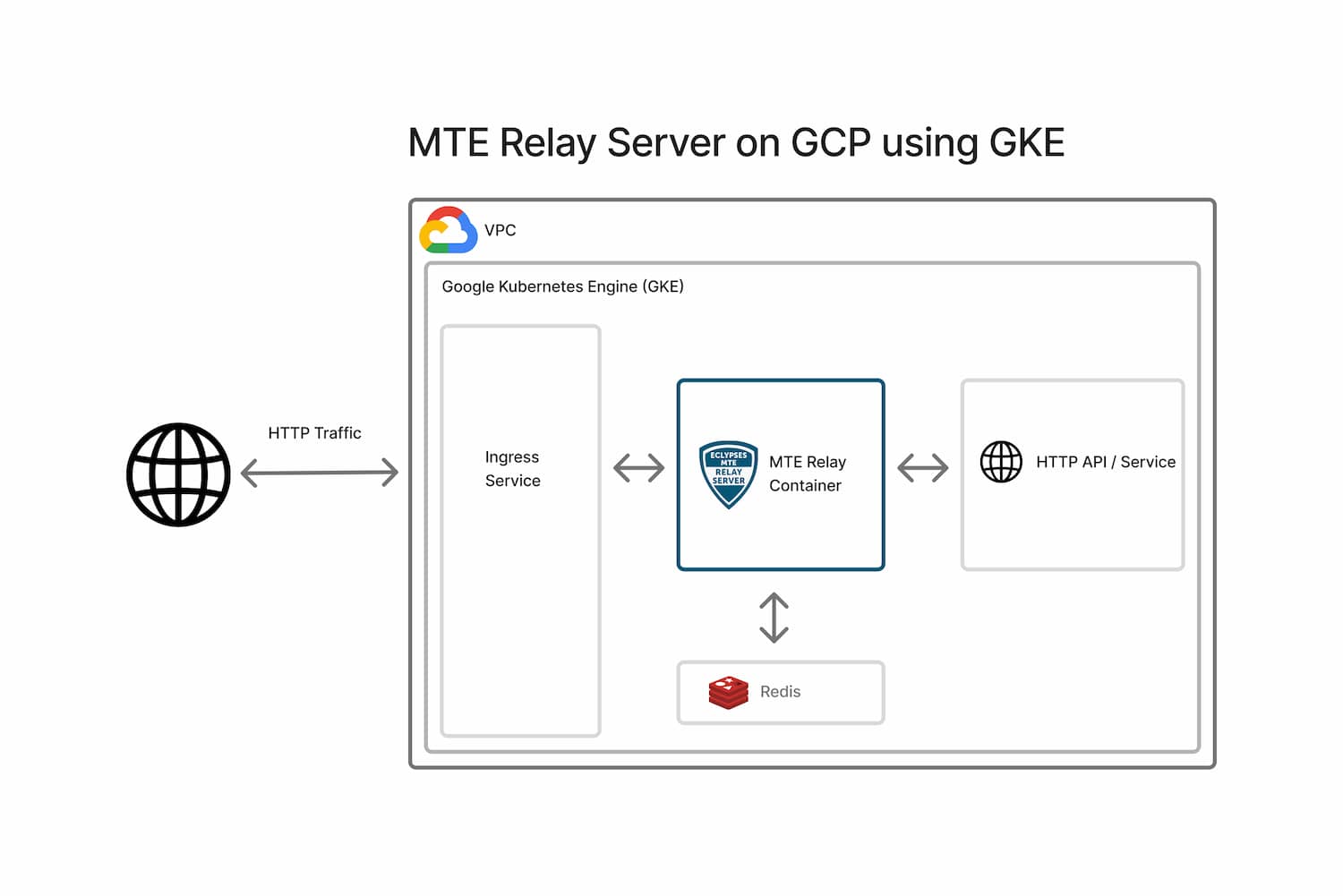
Server Configuration
MTE Relay Server is configured using environment variables.
Using a DOMAIN_MAP (Recommended)
Use the DOMAIN_MAP Builder tool to configure your domains visually, validate your settings, and copy a ready-to-use DOMAIN_MAP value — no manual JSON editing required.
DOMAIN_MAP is a JSON object keyed by the Host header that arrives with each request.
The value for each key is a settings object that tells the proxy how to process the request.
Settings
| Field | Type | Purpose |
|---|---|---|
| upstream | string | Full URL (http://localhost:8080, https://api.internal) |
| pass_through_routes | string[] | Paths that use standard HTTP proxy, without MTE encryption |
| client_id_secret | string | Legacy shared secret used by some auth layers |
| cors_origins | string[] | List of allowed CORS origins for preflight requests |
| cors_methods | string[] | List of allowed CORS methods for preflight requests |
| headers | string | A JSON object of additional headers to add to proxied requests |
Examples
- Single Proxy: Requests with Host header
mte-api.company.comare decrypted and forwarded tohttp://internal-service. The/healthroute is proxied without MTE encoding/decoding.
{
  "mte-api.company.com": {
    "upstream": "http://internal-service",
    "client_id_secret": "8KeJmtuKweUhymNJmGHvGMrJCUtHxhQG",
    "pass_through_routes": ["/health"],
    "cors_origins": ["https://app.company.com"]
  }
}
- Multi-service proxy that handles:
- Incoming encoded requests for
billing.company.io, forwarding tohttp://billing-servicewith/readyand/liveroutes unencoded. - Request to
auth.company.io, forwarding tohttp://auth-servicewith/healthroute unencoded. - All other requests (any Host) are proxied to
http://default-backend:8080without encoding.
{
  "billing.company.io": {
    "upstream": "http://billing-service",
    "pass_through_routes": ["/ready", "/live"],
    "client_id_secret": "8KeJmtuKweUhymNJmGHvGMrJCUtHxhQG",
    "cors_origins": ["https://app.company.com"]
  },
  "auth.company.io": {
    "upstream": "http://auth-service:3000",
    "pass_through_routes": ["/health"],
    "client_id_secret": "heYBRbTr3QNBgQFV6x6YpfWqyEs2Tj8F",
    "cors_origins": ["https://app.company.com"],
    "cors_methods": ["GET", "POST", "OPTIONS"]
  },
  "*": {
    "upstream": "http://default-backend:8080",
    "client_id_secret": "PmNPtWJMzz46S9k8cY7du5Z6XYc9B5Ad",
    "cors_origins": ["https://app.company.com", "http://localhost:3000"]
  }
}
Export as one-line env var:
export DOMAIN_MAP='{ "billing.company.io": { "upstream": "http://billing-service", "pass_through_routes": ["/ready", "/live"], "client_id_secret": "8KeJmtuKweUhymNJmGHvGMrJCUtHxhQG" }, "auth.company.io": { "upstream": "http://auth-service", "pass_through_routes": ["/health"], "client_id_secret": "heYBRbTr3QNBgQFV6x6YpfWqyEs2Tj8F" }, "*": { "upstream": "http://default-backend:8080", "client_id_secret": "PmNPtWJMzz46S9k8cY7du5Z6XYc9B5Ad" } }'
Host header derivation
The Host header is taken directly from the authority component of the absolute URL used in the request.
For example, https://api.example.com/users/1 the authority is api.example.com (port 443 is implicit for HTTPS), so the Host header sent by the client is exactly:
Host: api.example.com
If the URL contains an explicit port (https://api.example.com:8443/users/1) the header becomes:
Host: api.example.com:8443
DOMAIN_MAP must therefore use the exact same string—domain only, or domain:port—to match the incoming Host header. Or, use a wildcard "*" to match any host.
Host Matching
MTE Relay Server performs an exact match against the Host header (case-insensitive).
If an exact match is not found, it checks for a wildcard ("*").
If no match is found, the request is rejected with 404.
Using individual Environment Variables (Legacy)
Using these environment variables will result in the MTE Relay Server being configured to only handle a single domain. This method is deprecated in favor of using the DOMAIN_MAP variable. If both are provided, DOMAIN_MAP will take precedence.
Example:
UPSTREAM- Upstream API or service URL.CLIENT_ID_SECRET- Secret for signing client IDs (minimum 32 characters).PASS_THROUGH_ROUTES- Comma-separated list of routes proxied without encoding/decoding.CORS_ORIGINS- Comma-separated list of allowed origins.CORS_METHODS- Comma-separated list of allowed methods. Default:GET, POST, PUT, DELETE.
UPSTREAM='https://api.my-company.com'
CLIENT_ID_SECRET='2DkV4DDabehO8cifDktdF9elKJL0CKrk'
PASS_THROUGH_ROUTES='/health,/version'
OUTBOUND_TOKEN='s3cr3tT0k3nV4lu3'
Additional Environment Variables
PORT- Default:8080.LOG_LEVEL- One of trace, debug, info, warning, error, panic, disabled. Default:info.FORWARD_HOST_HEADER- StampX-Forwarded-Hoston upstream requests. Default:true. See Forwarding Headers. Since 4.7.0
Security
Container Hardening
MTE Relay Server is built and hardened using the following practices:
- Minimal base image — The runtime image uses Google's
Distroless
cc-debian12base. It contains only the application and its runtime dependencies — no shell, no package manager, and no general-purpose OS utilities — which dramatically reduces the attack surface. - Multi-stage build — The application is compiled in a separate
golangbuild stage. Build tooling and source never ship in the final image; only the compiled binary is copied forward. - Non-root runtime — The container runs as a dedicated unprivileged
user (
nonroot). No root privileges are required at runtime. - Minimal surface — Only port
8080is exposed, and the image runs a single binary entrypoint. - No persisted secrets — No sensitive data is stored in the container; all configuration is supplied at runtime via environment variables.
Vulnerability Scanning
Container images are scanned for known vulnerabilities with Docker Scout prior to publication to the Google Cloud Marketplace. Scan reports for the current image tag are available from Eclypses Support on request (see Support).
Customers can also generate their own native scan evidence within GCP by enabling Artifact Registry vulnerability scanning (Container Analysis) on the image they pull and run in GKE. This produces Container Analysis findings directly within your own Google Cloud project.
Maintenance
Release Cadence
Updated container images are published on an as-needed basis — when new
features, dependency updates, or fixes warrant a release. Security patches
are issued out-of-band as needed and are not tied to a fixed calendar
cadence. Each release is versioned (see the image tag, e.g. 4.7.0) and
distributed through the Google Cloud Marketplace.
Patch SLA
Eclypses' commitment for security patches:
- Critical vulnerabilities are addressed in a patched image within 30 days of confirmed disclosure.
- Lower-severity issues are addressed in a subsequent release.
To receive an updated image, pull the latest tag and update your GKE deployment manifest to reference it.
Fault Recovery
- Relaunch the Relay container; clients will automatically re-pair.
Support
MTE Relay Server is a commercially supported product from Eclypses.
Support and security-patch SLAs (including the 30-day critical-patch
commitment described under Maintenance) are provided to
licensed/subscribed customers. For escalations, scan reports, or hardening
documentation, contact Eclypses Support:
📧 customer_support@eclypses.com
🕒 Monday–Friday, 8:00 AM–5:00 PM MST (excluding holidays)