MTE Relay Control Plane
MTE Relay 5.0.0-beta.1 introduces a control plane: a lightweight management
instance with a web admin panel that lets you edit relay configuration at
runtime and distributes those changes to every relay worker in your fleet. It
works the same way in Kubernetes, OpenShift, Docker Swarm, Docker Compose,
Amazon ECS, and bare processes.
Everything on this page applies equally to MTE Relay Server and MTE API Relay; the control plane is the same code in both products. One thing to know: overrides are global per control plane instance, so every worker polling the same panel receives the same override document. Run one control plane per fleet, and do not share a single panel between an MRS fleet and an MAR fleet.
This walkthrough deploys a control plane and a worker fleet with Docker Compose, wires the environment variables on both sides, and covers how to run the panel itself. It also explains the two behaviors you should understand before using it in production: the split between live fields and restart fields, and what happens when something goes wrong.
How it works
The control plane is the same container image as the relay, started with
MODE=control. It serves the admin panel and a small config API. Relay
workers poll it about every 3 seconds with a version tag; when nothing
changed, the reply is a tiny header only response. The same poll doubles as a
heartbeat (hostname, relay version, uptime, applied config version), which is
what powers the Fleet page. There is no separate registration step:
workers appear in the panel as soon as they start polling.
Configuration edits are sparse overrides. The panel stores only the fields you explicitly set, and on each worker a field resolves in this order:
override from the control plane > worker environment variable > built in default
Your deployment keeps its environment variable configuration as the baseline, and the control plane is a thin layer on top. Reverting a field in the panel returns each worker to its own baseline.
Quick start with Docker Compose
One shared token connects the two sides. The control plane refuses to start
without CONTROL_PLANE_TOKEN, and every worker poll carries it as a bearer
token.
services:
  control-plane:
    image: 321186633847.dkr.ecr.us-east-1.amazonaws.com/customer/on-prem/mte-relay-server:5.0.0-beta.1
    # A fresh named volume is owned by root, and the relay image runs as the
    # unprivileged nonroot user, so the control plane cannot write to /data
    # without this. See the note below for the alternative.
    user: "0:0"
    environment:
      MODE: control
      PORT: "8081"
      CONTROL_PLANE_TOKEN: change-me-shared-token
      ADMIN_PW: change-me-admin-password
      CONTROL_PLANE_DATA_DIR: /data
    volumes:
      - control-plane-data:/data
    ports:
      - "8081:8081"

  relay:
    image: 321186633847.dkr.ecr.us-east-1.amazonaws.com/customer/on-prem/mte-relay-server:5.0.0-beta.1
    environment:
      LICENSE_KEY: your-license-key
      COMPANY_NAME: your-company-name
      DOMAIN_MAP: '{"*": {"upstream": "https://your-upstream.example.com"}}'
      CONTROL_PLANE_URL: http://control-plane:8081
      CONTROL_PLANE_TOKEN: change-me-shared-token
    ports:
      - "8080:8080"
    depends_on:
      - control-plane

volumes:
  control-plane-data:
Two details worth calling out:
- Workers still need a baseline
DOMAIN_MAP. A worker pointed at a fresh, unconfigured control plane exits without one. Give every worker its normal environment configuration; the control plane overrides it live. - Mount a volume at
CONTROL_PLANE_DATA_DIR, and make sure it is writable. The control plane persists its override document (with a monotonically increasing version) and the admin session signing secret there, so both survive restarts. The relay image runs as the unprivilegednonrootuser, uid 65532, while Docker creates a fresh named volume owned by root. Without theuser: "0:0"above, the control plane exits at startup withpersist admin secret: write temp file: permission denied. See Backing up and restoring the override document for how to copy that state off the volume and put it back.
To keep the container unprivileged instead, create the volume and hand it to
uid 65532 once, before the first docker compose up, then drop the user
line. Compose prefixes volume names with the project name, which is the
directory name unless you set it:
docker volume create myproject_control-plane-data
docker run --rm -v myproject_control-plane-data:/data busybox chown 65532:65532 /data
Start the stack, then open http://localhost:8081 and sign in with username
admin and the password you set in ADMIN_PW.
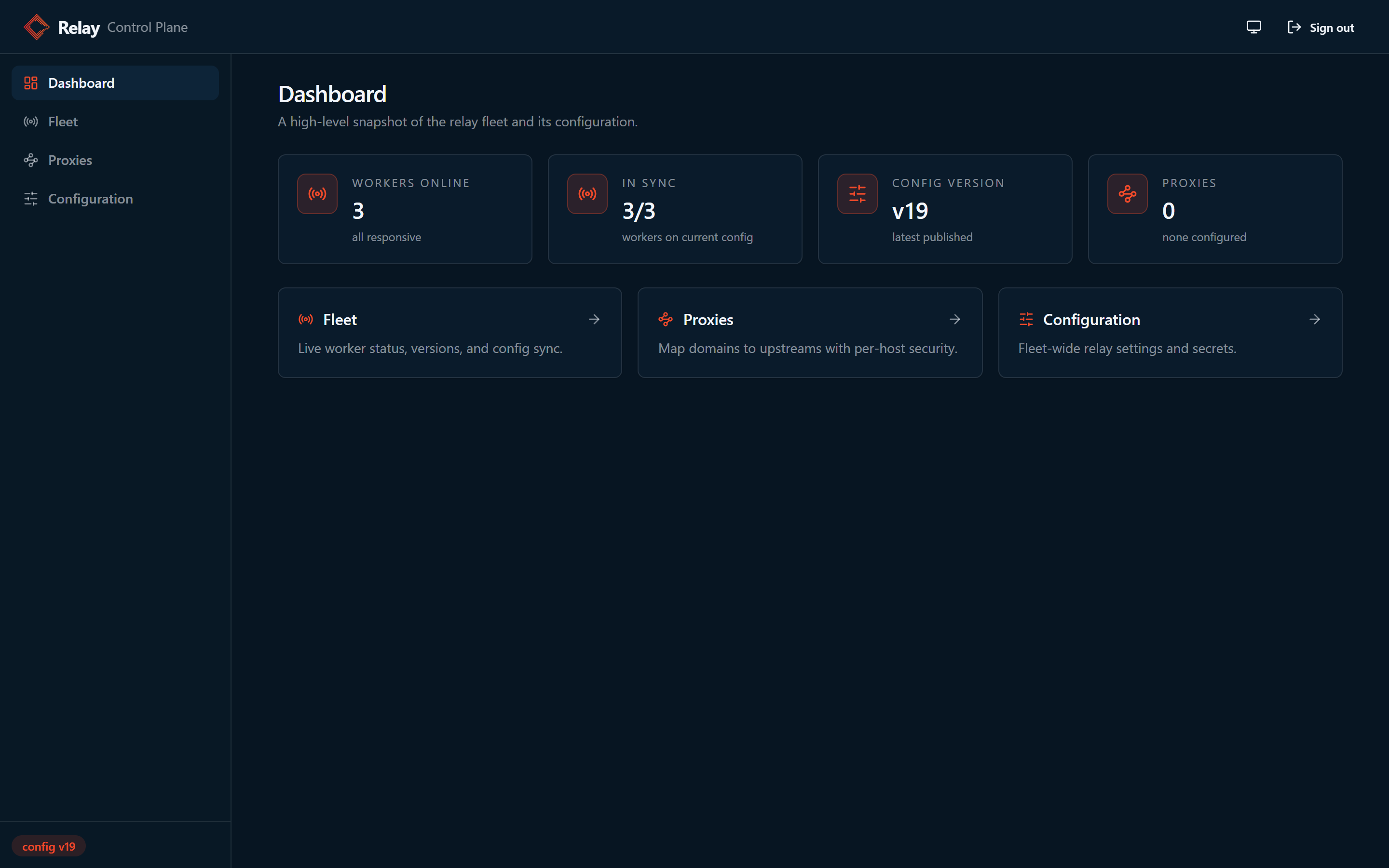
The dashboard shows the fleet at a glance: workers online, how many are in sync with the latest config version, and how many domains are mapped. Your worker appears within a few seconds of starting.
Environment variable reference
Control plane instance:
| Variable | Required | Notes |
|---|---|---|
MODE=control | Yes | Selects control plane mode. The default MODE=relay runs the data plane. |
CONTROL_PLANE_TOKEN | Yes | Shared bearer token. The control plane refuses to start without it. |
CONTROL_PLANE_DATA_DIR | Yes | Directory for the override document and session secret. Mount a volume or PVC here. |
PORT | No | Listen port for the panel and API. |
ADMIN_PW | Recommended | Admin panel password. The panel shows a persistent warning while the default password is in use. |
ADMIN_JWT_SECRET | No | Seeds the session signing secret on first boot only; after that the persisted secret wins. It can be rotated from the panel. |
Relay workers:
| Variable | Required | Notes |
|---|---|---|
CONTROL_PLANE_URL | Yes | Enables the poll agent on the worker. |
CONTROL_PLANE_TOKEN | Yes | Must match the control plane token. |
DOMAIN_MAP | Yes | Baseline routing config, still required at worker boot. |
CONTROL_PLANE_POLL_SECONDS | No | Poll interval, 3 seconds by default with jitter. |
RELAY_RUNTIME | No | Display only. Pins the runtime shown on the Fleet page (kubernetes, openshift, swarm, compose, ecs, or host) when the automatic detection is too coarse. |
Running the control plane
The control plane is always its own service. One process runs one mode: with
MODE=control the image serves the panel and the config API, and without it
the same image serves traffic. That split is what keeps a panel fault, a
panel restart, or a panel upgrade off the request path, and it is why
applying a restart field never bounces the panel you are applying it from.
Three rules cover nearly every deployment.
Run exactly one instance
The override document is one JSON file owned by one process. The version counter that rejects stale saves lives in that process's memory, and the file is written atomically with a temp file and a rename. There is no cross process locking, so a second instance pointed at the same volume is not a second copy of the same panel. It is a second panel that happens to overwrite the same file.
Running two or more instances produces:
- Silent config loss. Each instance keeps its own version counter and
overwrites the other's
overrides.json. The last write wins, and the save that lost still reports success to the admin who made it. - A partial fleet view. Worker polls land on whichever instance the load balancer picked, and the Fleet page is built from the polls that a single instance received. Each panel shows a slice of the fleet.
- A split fleet on Docker Swarm and Compose. A named volume is per node, so instances scheduled on different nodes read different override documents and the workers divide into populations running different configuration.
Nothing inside the control plane can tell that it has been scaled, so the result is divergence rather than an error. Pin the replica count to one.
Downtime on a single instance costs very little: workers keep serving their last applied configuration while it is gone, and catch up on the next poll once it returns. Scale the workers as far as you need. One control plane serving many workers is the shape the poll model was built for.
Give it its own hostname
The panel loads its assets and calls its API from the root of the origin it
is served from, so it cannot be mounted under a path like
https://ops.example.com/relay-panel/. Point a hostname, or a dedicated
port, straight at the control plane root.
In production, leave the control plane port unpublished and reach it through
a reverse proxy on an internal hostname. The quick start above publishes
8081 only so you can open it on localhost.
server {
    listen 443 ssl;
    server_name relay-panel.internal.example.com;

    ssl_certificate     /etc/ssl/certs/relay-panel.crt;
    ssl_certificate_key /etc/ssl/private/relay-panel.key;

    # Operator network only.
    allow 10.0.0.0/8;
    deny all;

    location / {
        proxy_pass http://control-plane:8081;
        proxy_set_header Host $host;
        proxy_set_header X-Forwarded-For $proxy_add_x_forwarded_for;
        proxy_set_header X-Forwarded-Proto $scheme;
    }
}
The API carries secrets in both directions, so TLS in front of the panel is not optional. See Security notes for the rest of the requirements.
Keep development in the same shape
Use the same two service topology in development that you use in production, even when the whole stack is one relay worker on a laptop. The cost is a second service definition and a shared token. What it buys you is that the behavior worth learning early shows up locally: a restart field that sits pending until you roll the workers, a worker that rejects an override and reports why, and a save that reaches some workers a poll before the others. Run two or three relay replicas locally and the fleet view starts telling you things a single worker cannot.
Deployment templates
The worker manifests in the deployment guides run the data plane on its own. Adding the panel means adding a second service, wherever you deploy:
- Docker Compose: the quick start above is the template.
- Kubernetes: the on premise guides carry a control plane block next to the worker manifests, for MTE Relay Server and MTE API Relay.
- OpenShift: the same pages, with the SCC differences called out, for MTE Relay Server and MTE API Relay.
- Docker Swarm: the stack below.
Docker Swarm
Swarm needs two things the other runtimes do not.
Pin the control plane to one node. A named volume lives on the node that created it, so a task rescheduled elsewhere comes up with an empty store and your overrides appear to vanish. Pick a node and constrain the service to it.
Publish the panel in host mode. The default routing mesh publishes a port
on every node in the cluster, which is the opposite of what you want for a
page that edits license keys and client secrets. In host mode the port
binds only on the pinned node, where your reverse proxy can reach it.
services:
  control-plane:
    image: 321186633847.dkr.ecr.us-east-1.amazonaws.com/customer/on-prem/mte-relay-server:5.0.0-beta.1
    # A fresh named volume is owned by root and the image runs as uid 65532.
    # To stay unprivileged instead, create the volume on the pinned node and
    # chown it to 65532:65532 once, then drop this line.
    user: "0:0"
    environment:
      MODE: control
      PORT: "8081"
      CONTROL_PLANE_TOKEN: __YOUR_SHARED_WORKER_TOKEN__ # Update this value!
      ADMIN_PW: __YOUR_ADMIN_PASSWORD__ # Update this value!
      CONTROL_PLANE_DATA_DIR: /data
    volumes:
      - control-plane-data:/data
    ports:
      # Host mode: binds on the pinned node only, not on every node.
      - target: 8081
        published: 8081
        mode: host
    networks:
      - relay
    deploy:
      replicas: 1 # never more than one
      placement:
        constraints:
          - node.hostname == __YOUR_CONTROL_PLANE_NODE__ # Update this value!
      update_config:
        order: stop-first # the old task releases the volume before the new one starts

  relay:
    image: 321186633847.dkr.ecr.us-east-1.amazonaws.com/customer/on-prem/mte-relay-server:5.0.0-beta.1
    environment:
      DOMAIN_MAP: '{ "relay.example.com": { "upstream": "__YOUR_UPSTREAM_URL__", "client_id_secret": "__YOUR_CLIENT_ID_SECRET__", "cors_origins": ["__YOUR_CORS_ORIGINS__"] } }' # Update this value!
      REDIS_URL: redis://redis:6379
      CONTROL_PLANE_URL: http://control-plane:8081
      CONTROL_PLANE_TOKEN: __YOUR_SHARED_WORKER_TOKEN__ # Must match the control plane
    ports:
      - "8080:8080"
    networks:
      - relay
    deploy:
      replicas: 3
      update_config:
        order: start-first

  redis:
    image: redis:7.2
    networks:
      - relay
    deploy:
      replicas: 1

networks:
  relay:
    driver: overlay

volumes:
  control-plane-data:
Deploy the stack, then apply restart fields later with a forced update of the worker service only:
docker stack deploy -c mte-relay-stack.yml mte-relay
docker service ls
docker service update --force mte-relay_relay
The relay reads its configuration from environment variables, so a Docker
Swarm secret, which arrives as a file, cannot supply CONTROL_PLANE_TOKEN
or ADMIN_PW directly. Keep the stack file readable only by the operators
who deploy it.
For MTE API Relay, swap the image for
321186633847.dkr.ecr.us-east-1.amazonaws.com/customer/on-prem/mte-api-relay:5.0.0-beta.1.
Nothing else changes.
Live fields versus restart fields
Open Configuration in the panel. Every field carries one of two badges:
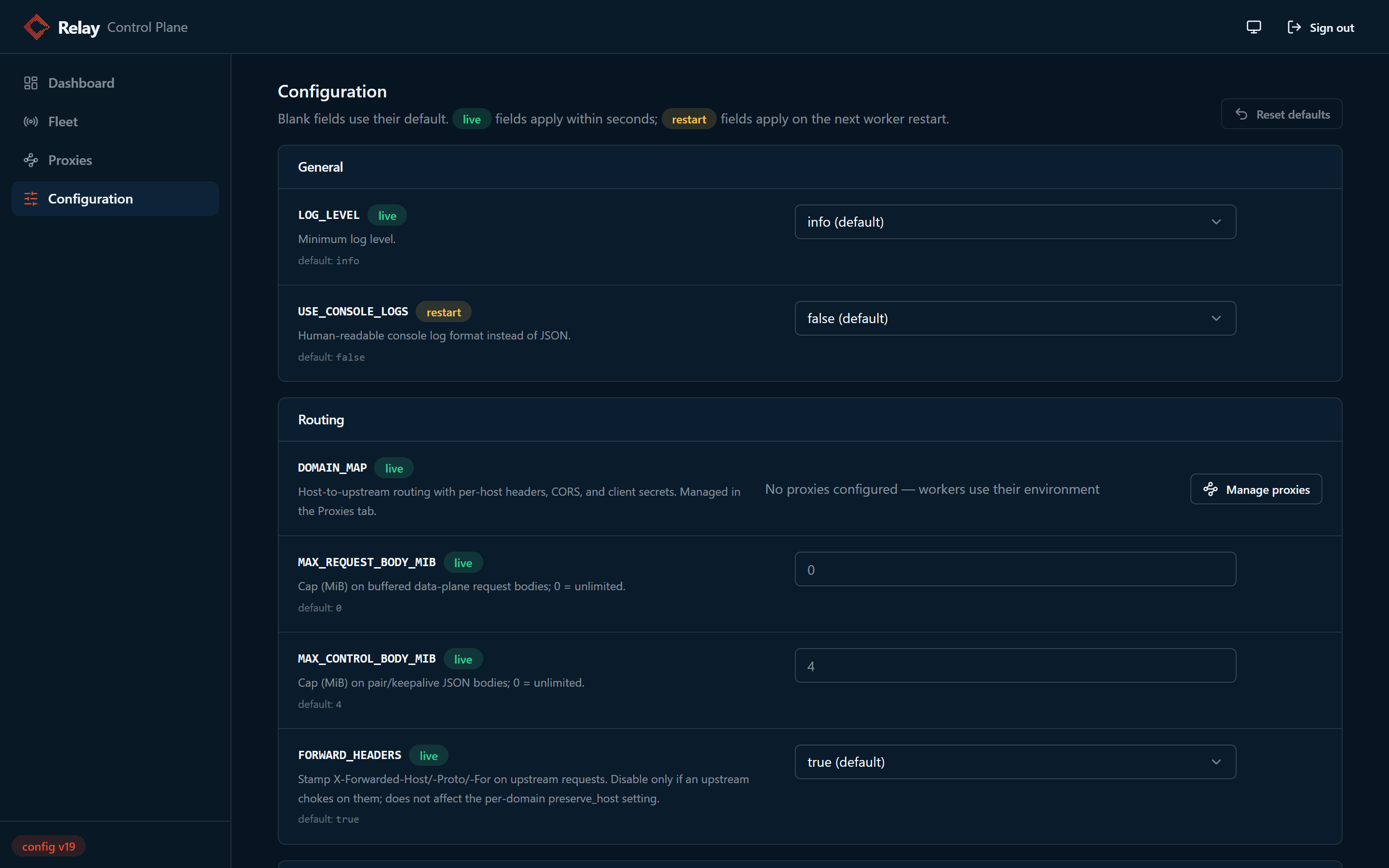
- live fields are read on the request path and apply within one poll
interval, with zero cost to request processing. The live fields are
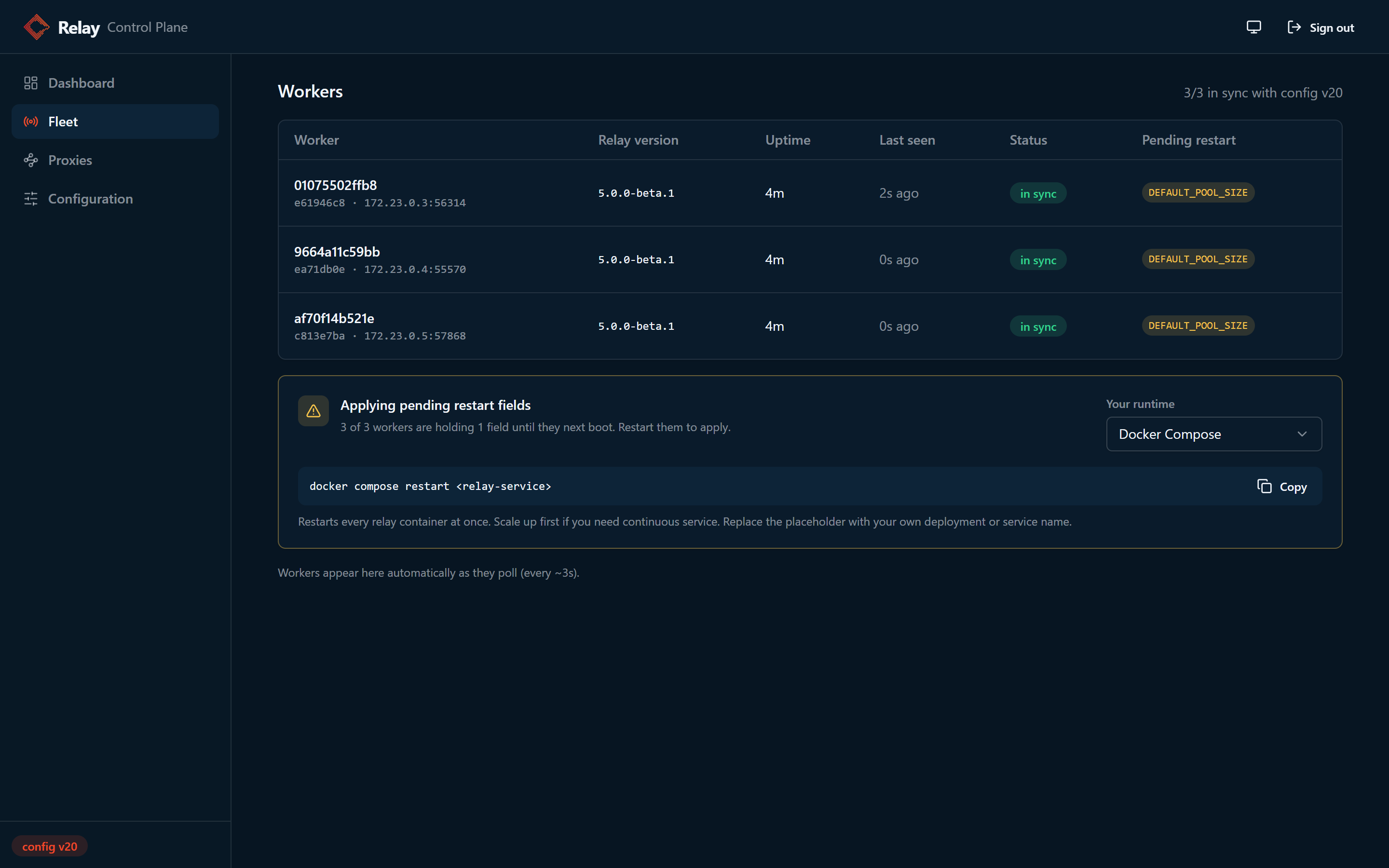
DOMAIN_MAP(managed on the Proxies page),LOG_LEVEL,MAX_REQUEST_BODY_MIB,MAX_CONTROL_BODY_MIB, andFORWARD_HEADERS. - restart fields (pools, ports, Redis tuning, MTE settings, and the rest) are consumed when a worker constructs its runtime objects at boot. Saving one persists the override immediately, but each worker applies it the next time it starts. Workers fetch overrides before validation and pool construction, so a normal restart completes the change.
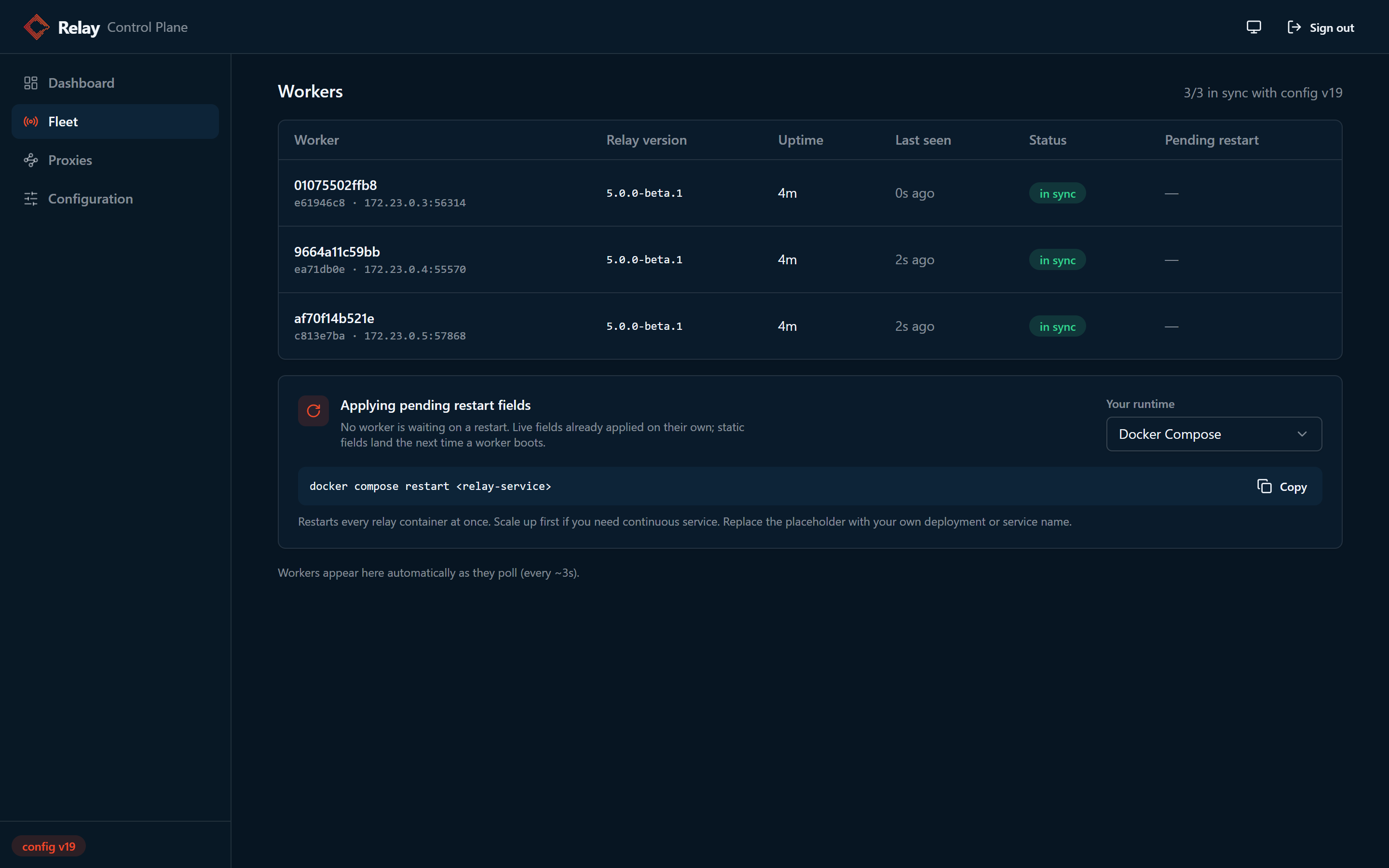
The Fleet page shows exactly which workers are still holding restart fields, and includes the restart command for your runtime with a copy button:
What is each worker actually running
The Fleet page can answer a question the applied version number alone cannot: what configuration is a given worker actually running right now? Expand any worker row to see every configurable field's running value and where it came from: an override from the panel, the worker's own environment variable, or the built in default. This matters most when workers have different environment baselines under the same overrides, and when a saved override is still waiting on a restart; fields in that state show their current running value with a pending restart badge.
Workers report this themselves. When the control plane has no current
report for a worker, it asks in the poll response, and the worker posts its
running configuration. The steady state poll stays a tiny header only
exchange, a control plane restart repopulates the reports within a few
seconds, and a worker on an older relay version simply shows as not
reported. Sensitive values never leave the worker: the license key, the
Redis URL, and any client secrets inside DOMAIN_MAP are replaced on the
worker by keyed fingerprints, so the panel can show that two workers run
the same value without ever holding the value itself.
The control plane never talks to your orchestrator and holds no cluster credentials, so it cannot restart workers for you. The restart itself is the one runtime specific step:
| Runtime | Command |
|---|---|
| Kubernetes | kubectl rollout restart deployment/<relay-deployment> |
| OpenShift | oc rollout restart deployment/<relay-deployment> |
| Docker Swarm | docker service update --force <relay-service> |
| Docker Compose | docker compose restart <relay-service> |
| Amazon ECS | aws ecs update-service --cluster <cluster> --service <relay-service> --force-new-deployment |
| systemd or bare process | systemctl restart mte-relay |
Fail safe behavior
The control plane is deliberately outside the data path, and workers are built to keep serving traffic no matter what happens to it:
- Control plane down. Workers start on their environment baseline and keep serving their last known good configuration. Polls never touch request processing. When the control plane comes back, workers catch up on the next poll.
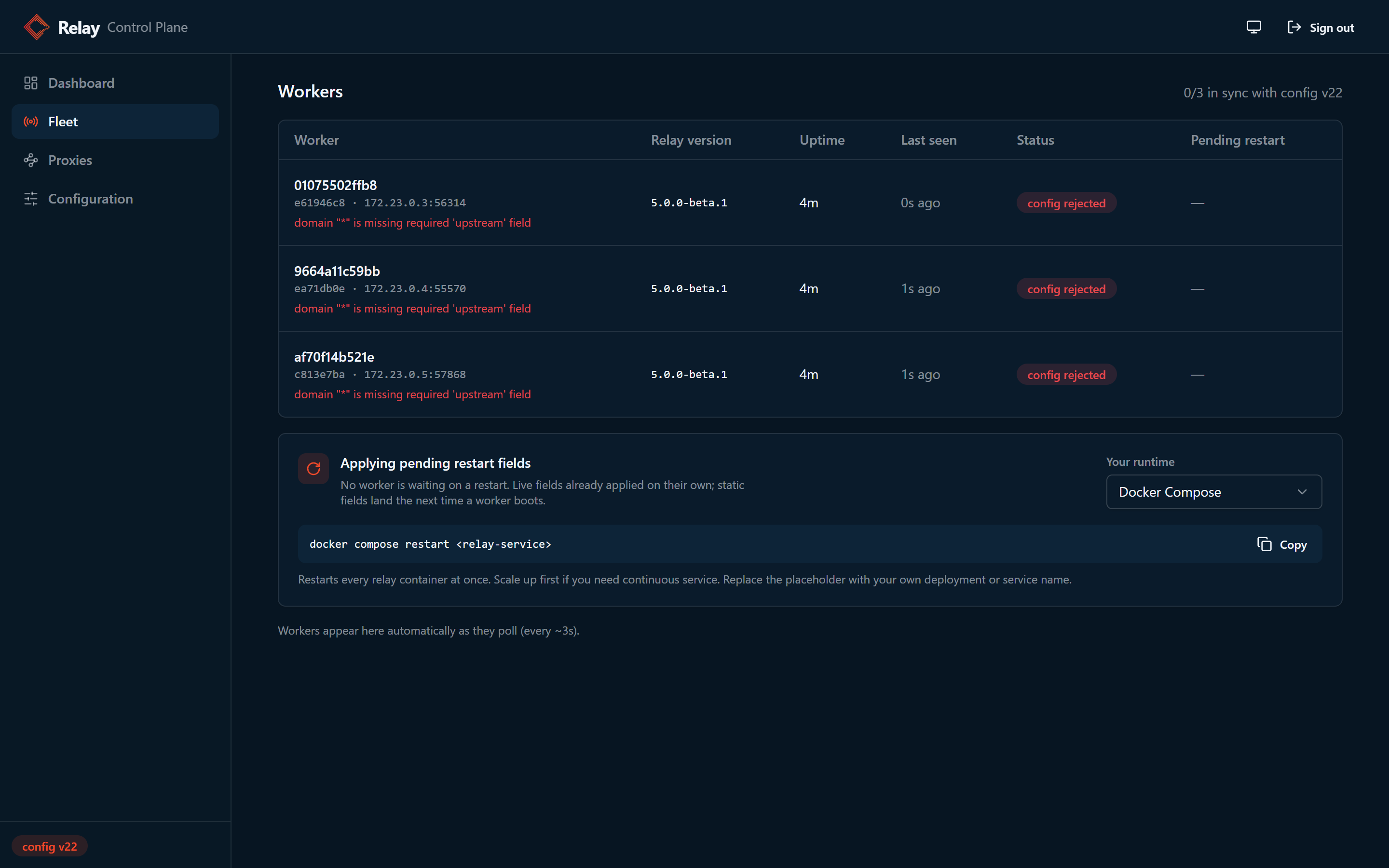
- Invalid override. If a worker receives an override set that fails its
validation (for example a
DOMAIN_MAPentry with no upstream), it rejects the whole set, keeps its current configuration, and reports the error in its heartbeat. The Fleet page shows the rejection per worker, and workers retry every poll until you fix the document:
- Mixed version fleets. During a rolling upgrade a worker may be older than the control plane and receive override keys its build does not know. It applies the keys it recognizes, skips the unknown ones, and reports them in its heartbeat; the Fleet page marks the worker as partial and lists exactly which keys it is not applying. Unknown keys degrade gracefully, while invalid values for known keys still reject the whole set as above.
To recover from a rejected edit, correct the field in the panel and save. Workers pick up the fixed document on their next poll and the fleet returns to in sync, with no restarts and no dropped traffic.
Backing up and restoring the override document
The control plane keeps its entire state in two small files inside
CONTROL_PLANE_DATA_DIR:
overrides.jsonis the override document, with the current version number and every field you have set in the panel. This is the file that matters.admin_jwt_secretis the session signing secret. Include it in backups so admin sessions survive a rebuild. If it is lost, the control plane generates a new one and every admin simply signs in again.
The panel has no export button, no import, and no rollback, and the version
counter only moves forward. If an admin saves a bad DOMAIN_MAP, the only
way back is retyping the old values, and if the volume is lost the override
state is gone. A backup you take yourself is the safety net, so take one
before any risky DOMAIN_MAP edit and before upgrades.
The control plane writes overrides.json atomically, so a copy taken at any
moment is a valid document. You never need to stop the control plane just to
take a backup.
Export with the API
This works on every runtime and needs nothing but network access to the panel. Sign in for a token, then read the document:
TOKEN=$(curl -s -X POST http://localhost:8081/api/login \
  -H 'Content-Type: application/json' \
  -d '{"username": "admin", "password": "<ADMIN_PW>"}' | jq -r .token)

curl -s -H "Authorization: Bearer $TOKEN" \
  http://localhost:8081/api/config > overrides-backup.json
On Kubernetes, run
kubectl -n <namespace> port-forward svc/<control-plane-service> 8081:8081
first.
Copy the file off the volume
The relay image is distroless, so there is no shell or tar inside the
container. docker cp and podman cp still work because the engine does
the copying, but kubectl cp against the control plane pod does not, since
it needs tar inside the container.
Docker Compose:
docker cp "$(docker compose ps -q control-plane)":/data/overrides.json ./overrides.json.bak
docker cp "$(docker compose ps -q control-plane)":/data/admin_jwt_secret ./admin_jwt_secret.bak
Docker Swarm. Named volumes live on the node running the task, so find that
node first, then run docker cp on it:
docker service ps --format '{{.Node}}' --filter desired-state=running <stack>_control-plane
# then, on that node:
docker cp "$(docker ps -q -f name=<stack>_control-plane)":/data/overrides.json ./overrides.json.bak
Podman:
podman cp <control-plane-container>:/data/overrides.json ./overrides.json.bak
podman cp <control-plane-container>:/data/admin_jwt_secret ./admin_jwt_secret.bak
Kubernetes. Use the API export above, or run a helper pod that mounts the
same PVC. A ReadWriteOnce disk attaches to one node at a time, so scale
the control plane down first. Workers keep serving their last applied
configuration the whole time:
kubectl -n <namespace> scale deploy/<control-plane-deployment> --replicas=0
kubectl -n <namespace> apply -f - <<'EOF'
apiVersion: v1
kind: Pod
metadata:
  name: pvc-access
spec:
  restartPolicy: Never
  containers:
    - name: pvc-access
      image: busybox
      command: ["sleep", "600"]
      volumeMounts:
        - { name: data, mountPath: /data }
  volumes:
    - name: data
      persistentVolumeClaim:
        claimName: <control-plane-pvc>
EOF
kubectl -n <namespace> wait --for=condition=Ready pod/pvc-access
kubectl -n <namespace> cp pvc-access:/data/overrides.json ./overrides.json.bak
kubectl -n <namespace> delete pod pvc-access
kubectl -n <namespace> scale deploy/<control-plane-deployment> --replicas=1
Restore
Both restore paths end the same way: workers see the version change on their next poll and converge within a few seconds. Fields with the restart badge still need the usual worker restart afterward.
Restore with the API, with no volume access and no control plane restart.
The If-Match: * header deliberately replaces whatever is stored now, and
the write is audited like any other save:
curl -s -X PUT http://localhost:8081/api/config \
  -H "Authorization: Bearer $TOKEN" \
  -H 'If-Match: *' \
  -H 'Content-Type: application/json' \
  -d "{\"overrides\": $(jq .overrides overrides-backup.json)}"
Restore by file: stop the control plane, place your saved overrides.json
back in CONTROL_PLANE_DATA_DIR, and start it again; the document is read
once at startup. With Compose:
docker compose stop control-plane
docker cp ./overrides.json.bak "$(docker compose ps -aq control-plane)":/data/overrides.json
docker compose start control-plane
On Kubernetes, reuse the scale down, helper pod, scale up sequence above
with kubectl cp pushing the file in instead of pulling it out. On Podman,
podman cp into the stopped container, then start it.
A restored file may carry an older version number than workers have already applied. That is fine: workers compare versions for equality, not order, so any mismatch delivers the restored document on the next poll.
Kubernetes notes
The wiring is identical in Kubernetes: run one control plane replica with a
PVC mounted at CONTROL_PLANE_DATA_DIR, expose it as a Service, and set
CONTROL_PLANE_URL and CONTROL_PLANE_TOKEN on the relay Deployment, with
the shared token in a Secret. The control plane serves an unauthenticated
GET /healthz for liveness and readiness probes; it reveals nothing but
liveness. The data plane equivalent is GET /api/mte-echo. Restart fields
are then a normal kubectl rollout restart deployment/<relay-deployment>.
Give the control plane Deployment replicas: 1 and
strategy: type: Recreate. The default rolling update starts the new pod
before the old one terminates, which puts two processes on the same override
document for a few seconds, and a ReadWriteOnce PVC will block the new pod
until the old one releases the volume anyway. Recreate avoids both. The
short gap while the pod restarts is harmless, since workers keep serving
their last applied configuration until it comes back.
Security notes
- Keep the control plane on an internal network and terminate TLS in front of it. The config API can carry secrets (license key, client id secrets, Redis URL), so do not expose it publicly.
- Admin sessions use a 15 minute sliding JWT: every authenticated request reissues a fresh token, so active admins stay signed in while an abandoned session expires. The signing secret can be rotated from the panel (Configuration, then Security), which signs out every admin immediately.
- Worker polls authenticate with
CONTROL_PLANE_TOKENas a bearer token, compared in constant time. - Every accepted config save is audited: the control plane logs the admin username, the caller's address, the new document version, and the names of the override fields that were added, changed, or removed. Field values are never logged, since they can contain secrets. The log stream is the audit record, so retain control plane logs accordingly.
- For fleets of two or more replicas behind a load balancer, set an explicit
client_id_secretper domain inDOMAIN_MAP, exactly as you would with environment variable configuration. On liveDOMAIN_MAPupdates, workers preserve existing generated secrets for hosts whose override does not specify one, so updates never invalidate active pairings.
Threat model
What an attacker gains at each level of access, and two design decisions your security team will want to see stated.
With an admin session: everything. An authenticated admin can read and
write every override, including the sensitive fields LICENSE_KEY and
REDIS_URL and any client_id_secret inside a DOMAIN_MAP override. The
config API returns these values in cleartext to any admin session. This is
deliberate and necessary: the panel edits those fields, and a config save
replaces the whole document, so if reads masked values a routine save would
overwrite the real secret with the mask. The panel shows sensitive fields as
masked inputs with a reveal toggle, but that masking guards against shoulder
surfing, not against an admin session; the session itself is the security
boundary. Two properties contain the exposure. The panel can only reveal a
secret an admin previously entered into it: overrides are sparse, and while
workers self-report their running configuration for the fleet view, their
sensitive values are replaced by keyed fingerprints before they leave the
worker, so a license key that lives only in worker environment variables
never reaches the control plane in recoverable form. And secret values
never appear in logs; audit lines carry field names only. Non-sensitive
baseline values (ports, pool sizes, log level, upstream URLs) do reach the
panel in those reports; that visibility is the point of the feature.
With the worker token: read, not write. CONTROL_PLANE_TOKEN
authenticates exactly one endpoint, the worker poll, and no poll can modify
configuration. The poll response is the full override document, secrets
included, so handle the worker token as carefully as the admin password:
store it in a Kubernetes Secret or the equivalent, not in a committed
manifest. A token holder can also forge heartbeats, which can show fake
workers on the Fleet page or briefly evict a real worker's row until its
next poll restores it, and can post a forged running configuration report
for a worker whose ID it knows. All of it is display only; traffic and
stored configuration are untouched.
With network access but no credentials: nothing. Unauthenticated callers reach the health endpoint, the static panel assets, and the login endpoint. Login compares credentials in constant time behind a shared exponential backoff that caps an online attacker near 288 guesses per day. Every other endpoint answers 401. The remaining exposure is the wire itself: the API moves secrets in both directions, which is why the TLS requirement below is not optional. One accepted tradeoff: anyone who can reach the panel can keep the single admin account locked by hammering failed logins. That is denial of service, not compromise, and it is another reason the panel belongs on an internal network.
Session token storage. The panel keeps the admin session token in
browser localStorage rather than an HttpOnly cookie. A cookie would
trade script injection exposure for cross site request forgery exposure and
the machinery to counter it. The mitigations: a strict Content Security
Policy (scripts limited to the panel's own bundle plus hashes of its two
boot scripts, no framing, no object embeds), no third party scripts at all,
and session bounds that limit a stolen token to a 15 minute idle window
inside an 8 hour absolute lifetime.
Deployment requirements. The model above assumes all of the following:
the control plane runs on an internal network and is never exposed
publicly, TLS is terminated in front of it, ADMIN_PW is changed from the
default, CONTROL_PLANE_TOKEN is stored as a secret, and control plane
logs are retained, since the log stream is the audit record.